AI Product Photography
Best AI Product Photography Tools for Shopify in 2026
There are dozens of AI photography tools. Most do the same thing: remove the background and paste your product onto a new surface. A few actually generate complete lifestyle scenes with realistic lighting and AI-generated models. This is an honest comparison of the 6 best options for Shopify merchants in 2026. What each one does well, what it costs, and where it falls short.
By LinkedIn: Brian Chen • 12 min read • Published February 11, 2026

Quick Answer
The best AI product photography tools for Shopify in 2026 are Prodofoto (true lifestyle photos with native Shopify integration), Photoroom (batch editing and backgrounds at scale), Lensia (native Shopify app with on-model photos and AI video), CreatorKit (product photos plus video ads inside Shopify), Flair AI (creative scene composition with a canvas editor), and Pebblely (budget-friendly background generation with a Shopify app). Most tools cost $8-$40/month. The most important difference is whether a tool generates full AI lifestyle scenes or just swaps the background behind your product.
What To Look For in an AI Photography Tool
Not every AI photo tool does the same job. Some remove backgrounds. Some generate new backgrounds. Some create full lifestyle scenes where the product looks like it was photographed in a real environment. The quality gap between these categories is significant.
Shopify itself includes a free option. Shopify Magic removes backgrounds and generates simple scenes from text prompts, free on all Shopify plans. It handles basic cleanup fine, but it caps at 1 megapixel resolution and doesn't produce lifestyle photography. Think of it as a starting point.
For the tools on this list, five criteria separate the useful from the time-wasting.
- Shopify integration. Does it pull products from your catalog? Can it publish back to your listing? Or are you downloading, renaming, and re-uploading files for every SKU? At 10 products the manual cycle is fine. At 200 it's a full afternoon.
- Scene generation vs. background swap. Background-swap tools cut your product out and drop it on a new surface. The original lighting stays. Shadows don't match. Scene-generation tools build an entirely new image where the product is placed naturally with correct lighting, reflections, and shadows. The difference is visible.
- On-model capability. If you sell clothing, jewelry, or beauty products, you need images of people wearing or using your product. Most AI tools can't do this.
- Editing and refinement. AI doesn't nail it every time. Can you tweak the output, or do you regenerate from scratch?
- Price structure. Monthly subscription, credits, or per-download. The math depends on your catalog size and how often you shoot.
For a deeper look at how AI lifestyle photos differ from basic background removal, see our explanation of what AI lifestyle product photos actually are.
Here's what the gap looks like in practice. Same product image, processed through AI scene generation.
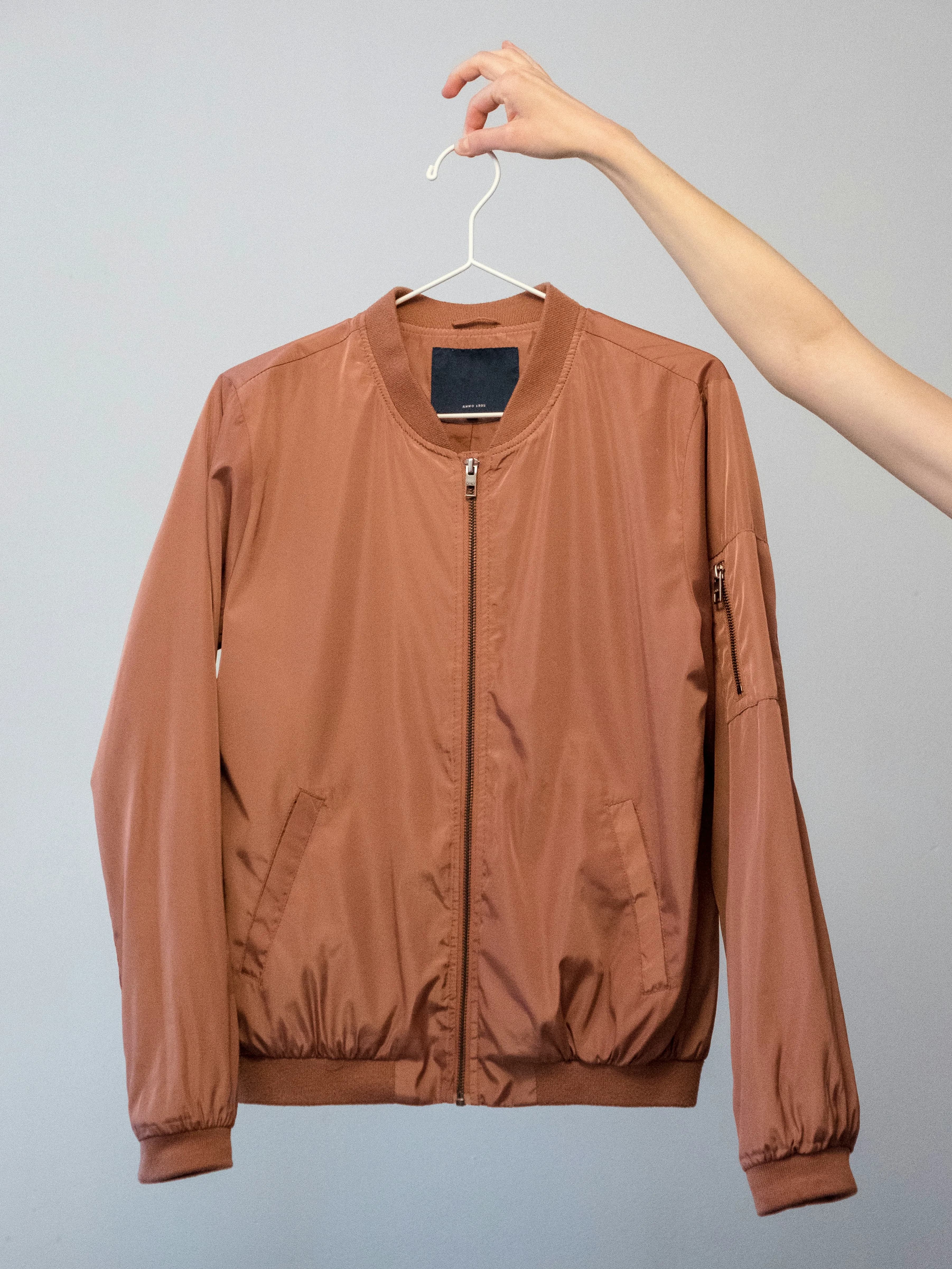
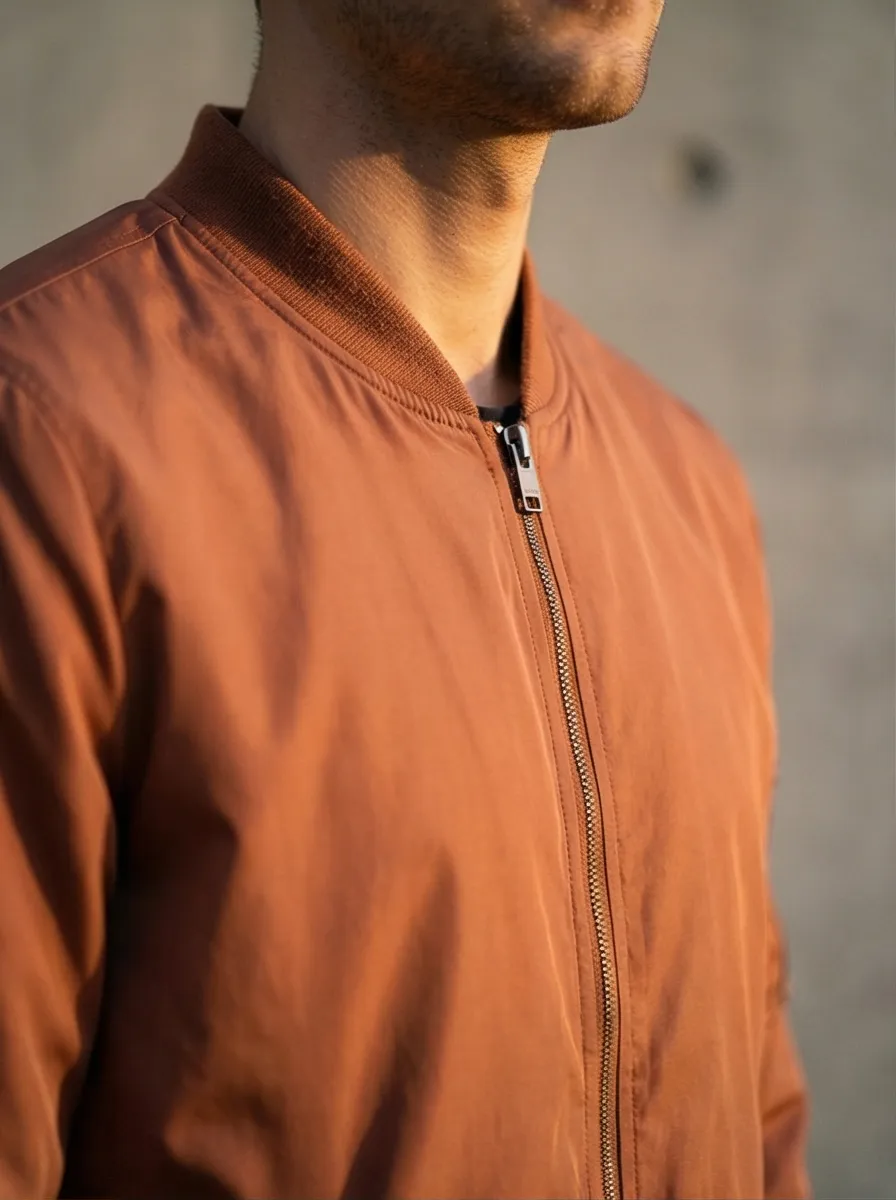
The original is a jacket on a plain background. The AI version places it in a styled environment with directional lighting, natural shadows, and visual context. That's the gap between a background swap and scene generation.
The AI product photography market hit $450 million in 2024 and is projected to reach $5 billion by 2035, according to Photoroom's AI photography statistics report. More tools, better quality, lower prices every quarter. The six tools below represent the strongest options right now.
The 6 Best AI Product Photography Tools for Shopify
This table covers the features that matter most for Shopify merchants. Detailed breakdowns for each tool follow below.
| Prodofoto | Photoroom | Lensia | CreatorKit | Flair AI | Pebblely | |
|---|---|---|---|---|---|---|
| Shopify app | Native (pull + publish) | None | Native (Built for Shopify) | Yes | None | Yes |
| Scene generation | Full lifestyle | Templates + AI BGs | Lifestyle scenes | AI backgrounds | Canvas scenes | Themed BGs |
| On-model photos | Yes | Virtual Model | Yes | No | Yes (fashion) | No |
| Inline editing | AI text editing | Full editor | 2 free re-gens | Basic | Canvas editor | Basic |
| Photos per generation | Up to 9 | 1 | 1 | 1 | 1 | 1 |
| Free tier | 10 credits | Watermarked | 15 credits | Unlimited gen, pay to export | Yes | 40 images/mo |
Prodofoto
Best for true lifestyle photos on Shopify
Prodofoto is a Shopify app that creates up to 9 AI product photos per shoot, depending on the selected setup. Choose a product and a photoshoot mode, generate, review the results, then publish selected photos directly to the Shopify listing.
The Shopify integration is the deepest on this list. Prodofoto pulls your product images and data straight from your store. The entire workflow happens inside Shopify admin: select, generate, review, publish. For merchants managing catalogs with hundreds of SKUs, that's the difference between a 5-minute task and a 5-hour task.
Scene quality is strong. The AI generates complete environments, not background swaps. Lighting wraps around the product naturally. Shadows fall where they should. On-model shots put apparel on AI-generated people. And the inline editing lets you refine any output with natural language instructions until the result is right.
For the full breakdown of how AI product photography works and what to expect, see our complete guide to AI product photography for Shopify.
Pricing: Free to start (10 credits). Starter: $9.99/month; Pro: $29.99/month; Business: $79.99/month (USD). A single-product shoot uses 5 credits; a bulk run uses 5 credits per product (10–20 credits for 2–4 products). Photo count depends on the selected setup, with up to 9 photos per shoot.
Best for: Shopify merchants who want true lifestyle photos with the least workflow friction. Strong for stores with large catalogs.
Limitations: Shopify-only. Bulk Generation is available on Pro and Business for 2–4 products per run, with a separate photoshoot for each product and shared settings. Larger collections need multiple batches. Multi-product generation instead places products together in one scene.
Photoroom
Best for batch editing and backgrounds
Photoroom is the largest AI photo editing platform, with over 200 million downloads. It started as a background removal tool, and that's still where it's strongest. The background removal is instant and extremely clean, even on complex edges like hair or translucent materials.
Beyond backgrounds, Photoroom generates AI scenes, offers a Virtual Model feature for placing clothing on AI-generated people, and has a batch editor that processes hundreds of images at once. The template library includes over 1,000 layouts pre-sized for Shopify, Amazon, Google Shopping, and social platforms.
The gap for Shopify merchants: there's no Shopify app. You upload images to Photoroom, edit them, export them, then upload to Shopify separately. Photoroom has an API if you want to build something custom, but out of the box it's a standalone editor. If you're editing 20 images, the export cycle is manageable. At 200, it stacks up.
Pricing: Free (watermarked). Pro from $7.50/month (annual billing). Max from $20.99/month. Monthly pricing runs higher.
Best for: Multi-channel sellers who need batch background editing and consistent formatting across Amazon, Shopify, and social.
Limitations: No native Shopify app. AI backgrounds lean template-driven. The download-reupload workflow adds friction at scale.
Lensia
Best for on-model photos with no monthly fee
Lensia earned the "Built for Shopify" badge, meaning it meets Shopify's highest standards for integration, performance, and security. It generates on-model photos, lifestyle scenes, and product-only shots directly from your Shopify admin.
Upload a product image, pick a style or model, and Lensia generates the photo. The app also includes AI video generation for creating short product clips alongside stills. A creative mode lets you design branded visuals like banners and social posts using your product images as the starting point.
The pricing model stands out. Lensia uses one-time credit packs instead of monthly subscriptions. If your output is bursty (a big shoot for a new collection, then nothing for weeks), you don't pay during the quiet months.
Pricing: Free (15 credits). $15 for 50 credits. $49 for 200 credits. $115 for 500 credits. One-time purchases, no recurring fees.
Best for: Merchants who want on-model and lifestyle photos inside Shopify without a monthly commitment.
Limitations: Smaller user base (launched September 2025). Credit packs can get expensive at high volume compared to subscriptions. Fewer background templates than larger platforms.
CreatorKit
Best for photos plus video ads inside Shopify
CreatorKit combines AI product photography with video ad creation inside one Shopify app. The photo tool generates backgrounds and styled product scenes. The video tool turns those same images into short video ads using templates designed for Facebook, Instagram, and TikTok.
For merchants running paid social alongside their Shopify store, the combined workflow is the draw. Generate a product photo, drop it into a video template, add text and music, export. One app instead of three.
The photo quality is functional, though a step below dedicated photography tools for scene realism. CreatorKit's pricing model is different from most: you generate unlimited photos for free. You pay when you download. That lets you test many variations and only export the winners.
Pricing: Unlimited free generations. Download-based: plans from $29/month or pay-per-image from $0.45/photo.
Best for: Merchants who need product photos AND video ads from a single Shopify app. Good for social advertising workflows.
Limitations: Photo quality trails dedicated tools. No true AI lifestyle scene generation. Pay-per-download gets expensive at volume.
Flair AI
Best for creative scene composition
Flair AI gives you more creative control than any other tool on this list. Instead of one-click generation, you get a canvas. Drag your product onto it, position props around it, describe the scene, and let the AI build the image around your composition. If you care about exactly how your product sits in the frame and what surrounds it, Flair is the tool for that.
It also handles on-model generation for fashion and jewelry. The AI places clothing onto generated models while preserving patterns, logos, and fabric textures. For brands with specific visual standards, the ability to art-direct the shot matters more than speed.
The tradeoff is workflow. No Shopify app. The canvas takes longer per image than one-click tools. Flair is a creative tool, not a production tool.
Pricing: Free plan available. Pro from $8/month. Pro+ from $18/month. Scale from $35/month.
Best for: Brands that want creative control over scene composition and art direction. Strong for fashion and jewelry.
Limitations: No Shopify integration. Slower per-image workflow. Steeper learning curve. Quality varies on some product types.
Pebblely
Best budget option
Pebblely does one thing well: it generates styled backgrounds for product photos at a price that's hard to beat. Upload your product image, pick a theme (studio, cafe, nature, kitchen, bathroom), or write a short description. Pebblely generates the background with your product placed in it. Simple.
The output is closer to styled product flat-lays than editorial photoshoots. No AI models, no complex environments. But for merchants who need clean, themed backgrounds across hundreds of products, the per-image cost on the Pro plan works out to less than a penny.
Pebblely has a Shopify app too, which puts it ahead of larger tools like Photoroom and Flair AI on workflow. You can generate styled photos from your Shopify admin without the download-upload loop.
Pricing: Free (40 images/month). Starter from $19/month (1,000 images). Pro from $39/month (unlimited).
Best for: Budget-conscious merchants who need themed product backgrounds at high volume.
Limitations: No AI human models. Backgrounds are themed surfaces, not full lifestyle environments. Product placement can look composited on complex items. Limited editing.
Pricing at a Glance
Every tool on this list has a free option. Here's how paid plans compare.
| Tool | Free Tier | Paid Plans Start At | Price Model |
|---|---|---|---|
| Prodofoto | 10 credits | $9.99/month | Monthly + credit top-ups |
| Photoroom | Watermarked exports | $7.50/month (annual) | Monthly subscription |
| Lensia | 15 credits | $15 (one-time) | Credit packs |
| CreatorKit | Unlimited generations | $29/month or $0.45/image | Per-download or monthly |
| Flair AI | Limited generations | $8/month | Monthly subscription |
| Pebblely | 40 images/month | $19/month | Monthly subscription |
Which Tool Fits Your Store
Catalog size and workflow should drive the decision more than image quality, which is solid across all of these tools.
Under 50 products?
Any tool works. Pick based on the image style you want. For lifestyle scenes, start with Prodofoto's or Lensia's free credits. For clean backgrounds, Pebblely's 40 free images per month might cover you.
50-500 products?
Workflow becomes the priority. Native Shopify tools (Prodofoto, Lensia, CreatorKit, Pebblely) save real time over download-and-reupload tools. At 200 SKUs, the time savings of direct publishing pays for the subscription.
500+ products?
You need a native Shopify app or an API. Prodofoto's one-click workflow handles scale without a developer. Photoroom's API works if you have engineering resources to build a custom pipeline.
Selling apparel or beauty?
On-model photos matter. Prodofoto, Lensia, Flair AI, and Photoroom's Virtual Model feature all generate AI models wearing or using your product. Prioritize tools with on-model capability.
Running paid social ads?
CreatorKit combines photos and video ads in one Shopify app. Lensia also generates AI video. Both save you from switching between tools for still and motion content.
For more on how lifestyle photos compare to white-background shots for conversion, see our lifestyle vs white background comparison.
Create Up to 9 Product Photos per Shoot
Prodofoto is a Shopify app that creates up to 9 AI product photos per shoot, depending on the selected setup. Choose a product and a photoshoot mode, generate, review the results, then publish selected photos directly to the Shopify listing.
Frequently Asked Questions
What is the best AI product photography tool for Shopify?
Prodofoto is a Shopify app that creates up to 9 AI product photos per shoot, depending on the selected setup. Choose a product and a photoshoot mode, generate, review the results, then publish selected photos directly to the Shopify listing.
How much do AI product photography tools cost?
Most tools cost between $8 and $40 per month. Some offer free tiers with limited generations. Per-image costs range from under $0.01 (Pebblely Pro) to about $1.00 depending on the tool and plan. A single traditional photoshoot runs $500-$2,000 for comparison.
Can AI product photos replace a professional photographer?
For most of your catalog, yes. AI generates photos that most shoppers cannot distinguish from traditional photography. For flagship hero campaigns where every detail matters, a real photographer still has an edge. The smart approach: use AI for the long tail and save your photo budget for hero shots.
Which AI product photography tools have native Shopify apps?
Prodofoto, Lensia, CreatorKit, and Pebblely all have Shopify apps. Prodofoto and Lensia offer the deepest integration with direct catalog access and one-click publishing back to product listings. Photoroom and Flair AI require you to export images and upload them to Shopify manually.
What is the difference between AI lifestyle photos and background removal?
Background removal cuts your product out and places it on a new surface. The lighting from the original stays, and shadows never match. AI lifestyle generation creates an entirely new image where the product is built into the scene with matched lighting, shadows, and reflections. The result looks like a real photoshoot.
Are AI-generated product photos good enough for ecommerce?
Yes. Thousands of Shopify stores use AI-generated product images in production. Most shoppers cannot tell the difference. Start with your weakest product images and compare conversion rates over 2 weeks.
Which AI photo tool is best for clothing and apparel?
Prodofoto, Lensia, and Flair AI all generate on-model shots where clothing appears on AI-generated people. Photoroom also offers a Virtual Model feature. If you sell apparel, prioritize tools that specifically offer on-model generation with pattern and logo preservation.
References
- Shopify: Best AI Image Generator Tools for Ecommerce (2026)
- Photoroom: AI Product Photography Statistics and Trends
- Photoroom: 6 Best AI Tools for Product Photography in 2026
- Baymard Institute: Current State of Ecommerce Product Page UX
- Business Dasher: Product Photography Statistics
- Claid.ai: AI Product Photography Tools for Ecommerce in 2026