AI Product Photography
AI Product Photography for Bags, Handbags & Luggage on Shopify
Bag photography fails on three specific fronts: scale reads wrong without context, collapsed or sagging shapes misrepresent the product, and shoppers can't see inside. AI solves all three — in 60 seconds per product, for under $1.
By LinkedIn: Brian Chen • 9 min read • Published July 15, 2026

Quick Answer
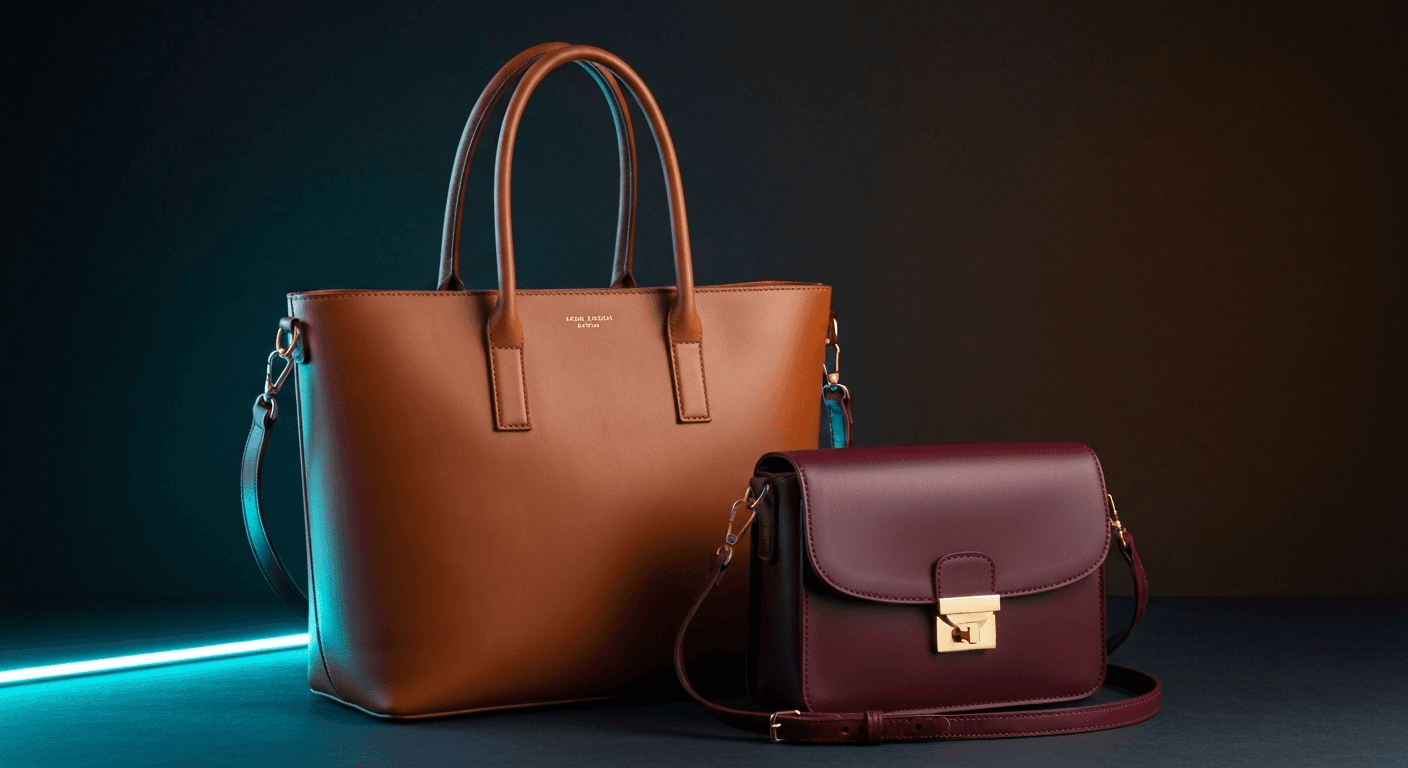
Bag and handbag product photography on Shopify requires more image types than most other categories: exterior hero, interior/open shot, scale reference, on-model carried shot, hardware detail, and at least one lifestyle scene. The biggest return driver is scale ambiguity— 42% of shoppers try to judge a bag's size from photos alone, and 28% of retailers don't include a single in-scale shot. AI product photography generates all required shot types in 60 seconds for under $1 per SKU, including on-model lifestyle images that show true bag size without booking a model.
Why Bag Photography Is Harder Than Other Categories
Bags have three photography problems that most other product categories don't share — and each one directly causes returns.
Scale ambiguity.A bag photographed on white looks the same whether it's a clutch or a weekender. 42% of shoppers try to judge a product's size from photos alone, yet 28% of major retailers don't include a single in-scale reference shot (Photta). Customers who can't assess scale skip the purchase — or buy and return.
Shape collapse.Unlike shoes or kitchenware, bags have no rigid structure unless they're stuffed. A flat, collapsed bag in photos looks smaller, cheaper, and shapeless. Traditional photographers use tissue paper or bag inserts to prop the shape — a step that adds cost and time, and still looks artificial if overdone.
Interior invisibility. Shoppers buying a bag need to see inside. Does it have a laptop sleeve? A phone pocket? How does the lining look? Interior shots are essential for conversion, but they're one of the most difficult shots to execute consistently — the right angle, the right prop load, the right lighting inside a dark interior.
| Photography challenge | Traditional approach | AI approach |
|---|---|---|
| Scale ambiguity | On-model shoot ($400–$800/SKU), prop references | On-Model mode places bag on AI figure — instant scale context |
| Shape collapse | Stuffing with tissue, internal supports, reshooting | AI renders bag with natural filled structure from source image |
| Interior shots | Manual positioning, small light, multiple angles | Lifestyle mode generates open-bag interior reveal at correct angle |
| Color accuracy | Color calibration tools, multiple lighting setups | Anchors on source product image; plain-English color editing |
| Material texture | Macro lens, raking light, specialized equipment | AI renders leather grain, pebble, canvas weave with photorealistic detail |
| Time and cost | 2–4 weeks, $150–$800/SKU (catalog shoots) | 60 seconds, under $1/product |
Required Shot Types for Bag & Handbag Listings
Bag buyers make decisions across more image types than almost any other product category. A high-converting bag listing needs at least 6 images, and 8–9 for premium or luggage products.
Exterior hero shot
Clean front view showing the bag's silhouette, proportions, and primary color. The primary image for all listing thumbnails — must be pixel-perfect.
3/4 angle — depth and structure
Shows the bag's depth and three-dimensional form. Critical for structured bags (totes, satchels) where the profile communicates capacity.
Interior / open reveal
The bag photographed open at an angle showing lining, compartments, zippers, and pockets. Answers the #1 pre-purchase question: what fits inside?
On-model / carried shot
The most conversion-critical image type for bags. A bag on a person's shoulder, in hand, or across body instantly communicates true size and shows how it looks in use.
Hardware and detail close-up
Zipper pulls, clasps, buckles, stitching, and logo hardware at close range. Premium hardware is a major purchase driver for accessories buyers.
Lifestyle scene
The bag in a real-world context: on a desk, in a coffee shop, at an airport gate, on a beach. Lifestyle converts 60% better than white-background-only (Rewarx, 2026).
Base / bottom detail
Bottom feet, base material, and any reinforcement — premium buyers check this. Especially important for structured handbags and laptop bags.
Scale reference flat lay
Overhead flat lay with a recognizable prop — a laptop, a water bottle — that visually communicates capacity. Removes size guesswork for borderline buyers.
AI Product Photography by Bag Type
Different bag categories have different primary photography requirements. Here's what to prioritize for each.
Tote bags & canvas bags
Scale context is everything. On-model shots (carried over shoulder or in hand) show true bag mouth opening and depth. Interior flat lays showing a laptop + water bottle communicate capacity instantly. Lifestyle: coffee shop, commute, beach.
Crossbody bags & shoulder bags
On-model cross-body shots are the primary conversion driver — they show strap length, body position, and real size simultaneously. Hardware close-ups (clasp, d-rings, zipper) signal quality. Lifestyle: city street, cafe, travel.
Backpacks & laptop bags
Interior structure is the top concern — buyers need to see compartment organization, padding, and laptop sleeve. Side-profile shots communicate depth. On-model shots show how the straps sit. Must-have: open interior reveal with visible pockets.
Clutches & evening bags
Small bags live or die on material and hardware quality. Close-up texture shots of leather, beading, or embossing are critical. Scale reference (next to a hand or wrist) helps. Lifestyle: formal table setting, event context.
Luggage & travel bags
Size comparison is the primary return driver — customers need to visualize checked vs carry-on restrictions. Interior organization shots (packing cubes, garment section) are critical. Lifestyle: airport, hotel lobby, outdoor adventure.
| Bag type | Must-have shots | Prodofoto mode |
|---|---|---|
| Tote & canvas bags | On-model (scale), interior flat lay, lifestyle | On-Model + Lifestyle |
| Crossbody & shoulder bags | On-model (cross-body), hardware close-up, lifestyle | On-Model + Lifestyle |
| Backpacks & laptop bags | Interior reveal (compartments), side profile, on-model | Lifestyle + Product-Only |
| Clutches & evening bags | Material close-up, scale reference (hand), formal lifestyle | Lifestyle + Product-Only |
| Luggage & travel bags | Size comparison, interior organization, travel lifestyle | Lifestyle + Infographic |
Before & After: Backpack Lifestyle Generation
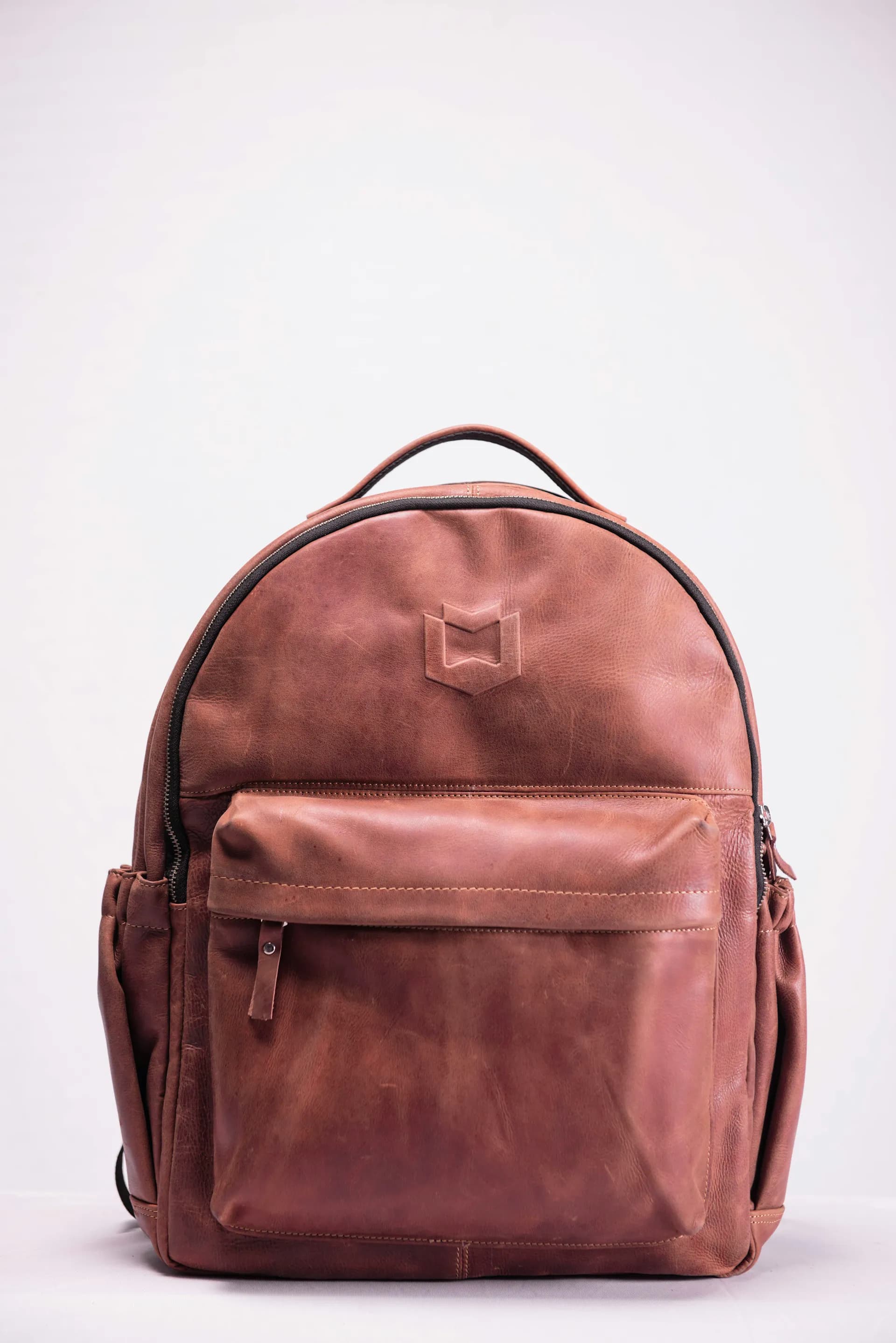
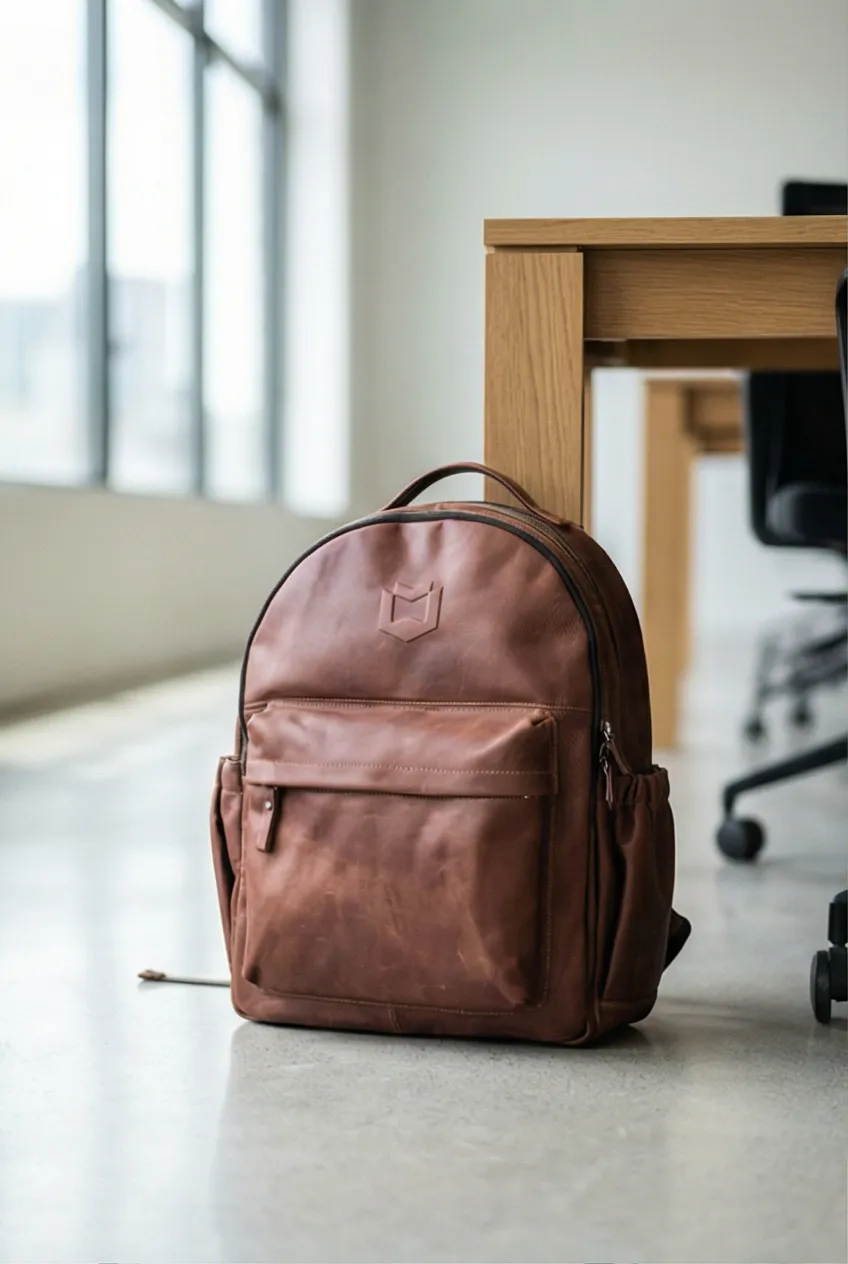
The original photo below is a clean white-background shot of a brown leather backpack — the standard catalog image most bag brands start with. The AI-generated version places the same bag in a lifestyle scene with matched lighting and environmental context, turning a product photo into something a shopper can actually visualize using.
5-Step Prodofoto Workflow for Bag Photography
From your first product to a full lifestyle image set, this is the workflow — entirely inside Shopify admin.
Open Prodofoto in your Shopify admin
Install Prodofoto from the Shopify App Store. It connects to your product catalog automatically — no uploading required.
Select a bag or handbag from your catalog
Choose any bag, backpack, tote, or luggage piece from your Shopify product list. Prodofoto pulls the existing product image as the source.
Choose your shoot mode
Pick Lifestyle for editorial bag scenes, On-Model to show the bag being carried, Product-Only for clean catalog hero shots, or Infographic to annotate key features like compartments, zippers, and hardware.
Generate up to 9 photos in 60 seconds
Prodofoto generates up to 9 bag photos in about 60 seconds. The AI places your bag in a fully rendered environment with matched lighting, shadows, and reflections — not a simple background swap.
Edit, review, and publish to Shopify
Use plain-English editing to refine any image — adjust the scene, lighting, or background. When satisfied, publish directly to your Shopify product listing in one click. No file downloads or manual uploads.
Related Reading
- The Complete Guide to AI Product Photography for Shopify — everything you need to know before choosing a tool
- AI Product Photography for Fashion & Apparel on Shopify — the broader fashion photography guide
- AI Product Photography vs Traditional Photography — cost, speed, and quality comparison with data
- How Much Does Product Photography Actually Cost in 2026? — full cost breakdown by category
- How to Use Prodofoto for Shopify Product Photography — step-by-step walkthrough
Try Prodofoto Free on Shopify
Install from the Shopify App Store. Your first 10 credits are free — enough to generate lifestyle scenes, on-model shots, and interior reveals for 2–3 of your bags. No credit card required. Photos publish directly to your listings.
Frequently Asked Questions
Can AI product photography show the interior of a handbag?
Yes. Prodofoto's Lifestyle mode generates interior-reveal shots — the bag photographed open at an angle so the lining, pockets, and capacity read clearly. Pair an interior shot with an exterior hero and an on-model shot to answer the three questions every bag buyer has: what does it look like, how big is it really, and how does it look being carried.
How do I show the true size of a bag in product photos?
Scale is the number-one return driver for bags. The most effective shots are on-model lifestyle images — a bag on a person's shoulder instantly communicates true size. Prodofoto's On-Model mode places your bag on an AI-generated model, which shows real-world scale without booking a photo session. A flat-lay with a recognizable prop (a coffee cup, a laptop) also communicates scale for product-only shots.
How much does traditional bag product photography cost?
A professional bag shoot typically costs $150–$400 per SKU for basic catalog shots. Add on-model shots and you're looking at $400–$800 per product — models cost $100–$300/hour minimum. A bag brand with 20 SKUs would spend $8,000–$16,000 on a full photography round. AI generates equivalent coverage — including on-model, lifestyle, and interior shots — for under $1 per product, in about 60 seconds each.
What product photos does a Shopify bag listing need?
A high-converting bag listing needs at least 6 images: an exterior hero on a clean background, a 3/4 angle showing depth and structure, an interior/open shot, an on-model lifestyle image showing scale, a detail shot of hardware and stitching, and a lifestyle scene showing the bag in use. Luxury bags or luggage benefit from 8–9 images, adding a zipper close-up, a bottom/base detail, and a flat-lay overhead.
Can AI generate realistic leather texture in bag product photos?
Yes. AI photography captures the specular highlights, grain pattern, and depth of leather with photorealistic accuracy — including the difference between full-grain, pebbled, and smooth leather. The key is starting with a clear original product image taken in even light. From that source, AI generates scenes where the leather texture is consistent and correctly lit for the environment.
How does Prodofoto handle color accuracy for bag product photos?
Prodofoto anchors on your original product image, so the bag color in the AI-generated output matches your actual product. If the first generation renders the leather in slightly different tones due to lighting context, use Prodofoto's natural-language editing to refine: 'adjust the leather to a warmer cognac tone' or 'make the black bag richer, more saturated.' Color editing updates in about 60 seconds without regenerating from scratch.
Can Prodofoto generate bag product photos for my entire Shopify catalog?
Yes. Prodofoto connects directly to your Shopify store and shows your full product catalog — no manual uploading. Select any handbag, backpack, tote, or luggage piece, choose a shoot mode (Lifestyle for editorial scenes, On-Model for carried shots, Product-Only for clean hero images, Infographic for feature callout annotations), and generate up to 9 photos per product. A bag brand with 25 SKUs can generate complete lifestyle and detail image sets in under 2 hours, for under $25 total.
References
- Handbag Photography for E-commerce: Shape, Scale, and Why Your Bags Look Flat — Photta
- Ecommerce Product Photography Conversion Rates: Stats 2026 — Rewarx
- Ecommerce Return Rates in 2026: Benchmarks by Category — Richpanel
- 50 AI Product Photography Statistics and Trends for 2026 — Photoroom
- Ecommerce Fashion Industry in 2026: Statistics, Trends and Strategies — Shopify
- Handbag Product Photography Done Right — Squareshot
- Prodofoto — Shopify App Store