Shopify · Agentic commerce
Shopify Product Photos for ChatGPT Commerce: A Merchant Checklist
How to prepare Shopify product photos for ChatGPT commerce — a clean, accurate primary image, square-safe framing, the right size and format, descriptive alt text and filenames, the product feed image field, and valid product structured data, plus common mistakes and a measurement plan.

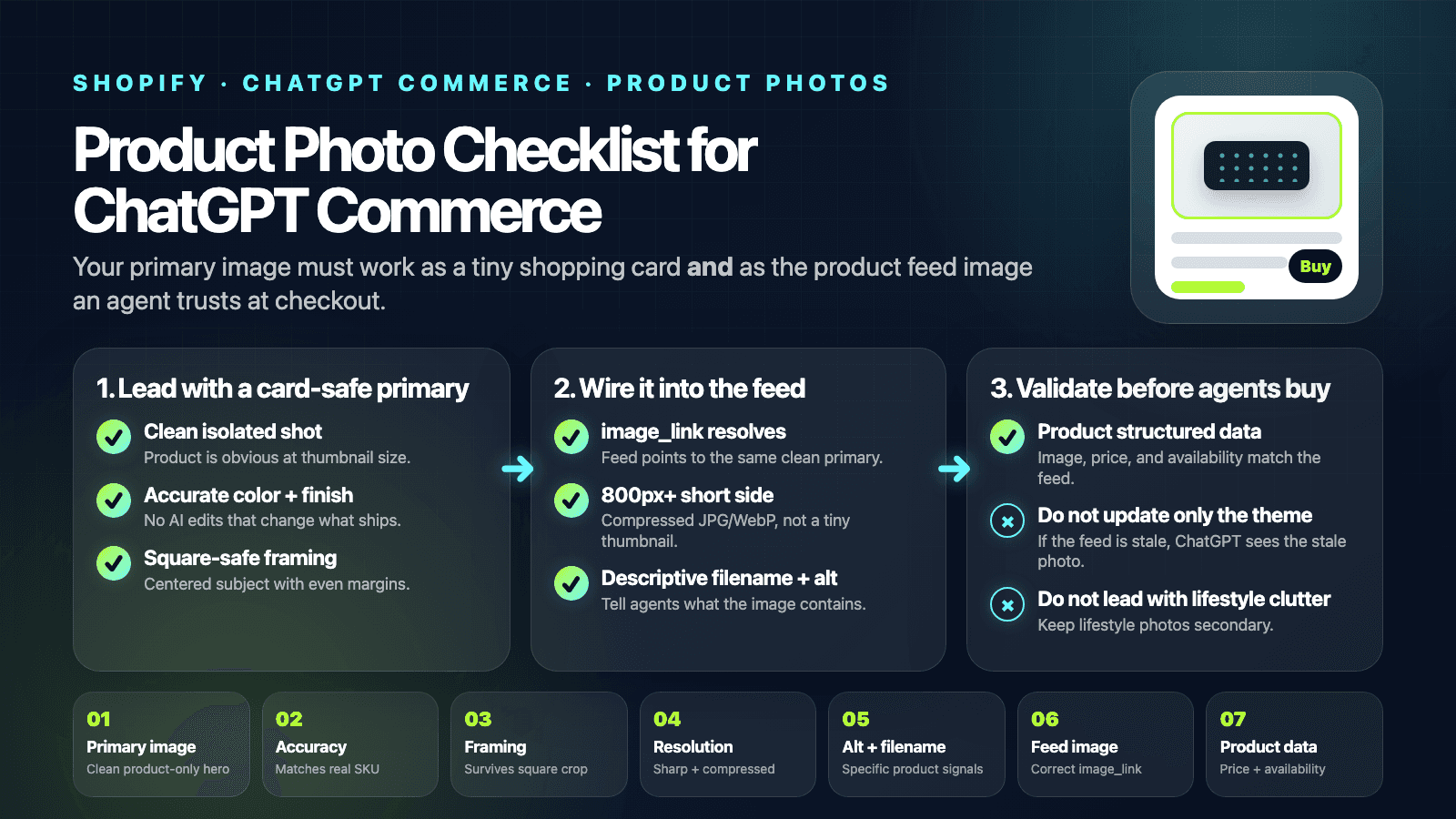
Quick answer
To show up well in ChatGPT commerce, your product photo has to work as a small card thumbnail and as the image your product feed serves: a clean, isolated primary image that accurately represents what ships, square-safe framing at the right size and format, descriptive alt text and filename, and a correct feed image field backed by valid product data. The photo is the front of the card — the feed and product data behind it are what an agent acts on.
ChatGPT commerce details (Instant Checkout, the Agentic Commerce Protocol, and Shopify support) evolve quickly — verify the current setup against OpenAI's and Shopify's own documentation. The image guidance here is durable as of June 1, 2026.
What ChatGPT commerce is — and where photos leak out
ChatGPT can now surface products and, through Instant Checkout built on the Agentic Commerce Protocol, let a shopper buy without leaving the chat — with Shopify merchants among the supported sellers. In that flow your product photo plays two roles: it is the image on the product card a shopper sees, and it is whatever your product feed serves to the agent. Both come from the same place, so the leak points are the same as for any image program — the primary you choose, its accuracy and framing, and whether the feed actually points at it.
This is the same direction covered in our guides to agentic commerce and optimizing photos for AI shopping agents, narrowed to the ChatGPT checkout experience specifically.
The ChatGPT commerce photo checklist
Each row is one thing to confirm for the product you want to surface. The first three rows are where most listings lose the card; the last two are where the purchase itself breaks.
| Element | Skip this | Do this | Why |
|---|---|---|---|
| Primary image The single image a ChatGPT product card shows. | a busy lifestyle scene with the product buried in it | a clean, well-lit shot with the product clearly isolated | ChatGPT renders a small product thumbnail; a clean primary reads at a glance and matches what the model says about the item. |
| Accuracy Whether the image matches what actually ships. | heavy retouching or AI scenes that change color or form | an image that matches the real product, color, and finish | Agentic checkout buys the literal product the shopper saw, so any mismatch turns into returns and policy problems. |
| Framing and aspect How the product sits inside a square-ish card. | extreme portrait/wide crops or the product hard against an edge | centered product with even margin that survives a square crop | Product surfaces crop toward square; an off-center subject gets clipped or floats in a card. |
| Resolution and format How crisp and fast the image is. | a tiny thumbnail or a multi-megabyte original | at least ~800px on the short side, compressed .webp or .jpg | Feeds and cards need an image sharp enough to look real and light enough to load. |
| Alt text and filename The text signals attached to the image. | empty alt and IMG_4821.JPG straight from the camera | descriptive alt and a filename that names the product | These help a model and a feed associate the picture with the right product, the same hygiene image SEO already rewards. |
| Product feed image field The image ChatGPT commerce actually reads. | updating only the theme and leaving the feed image stale | an image_link that points at the clean primary and resolves | ChatGPT commerce pulls images from your product feed, not your storefront DOM, so the feed field is what gets shown. |
| Product structured data Machine-readable price, availability, and image. | missing Product schema, price, or availability | valid Product data with image, price, and availability | Agents and feeds rely on machine-readable product data to list an item and to check it out correctly. |
Pick which shot leads using the product gallery sequence as a reference for what a strong primary image shows.
The product feed is the source of truth
The single most common ChatGPT commerce mistake is editing the storefront and forgetting the feed. ChatGPT does not scrape your live theme — it reads your product feed: the image_link, the price, and the availability your store exposes through the integration. If the feed's image still points at an old, off-center, or broken file, that is the image on the card, no matter how good the photo on your product page looks.
So treat the feed image field as the thing you are optimizing. Confirm the image_link points at your clean primary and resolves with no redirect or 404 — the same feed-image discipline behind optimizing for Google Shopping, applied to the ChatGPT surface.
The build workflow
Five steps take a product from a clean shot to a card and feed entry that an agent can show and check out.
- Pick a clean primary image. Choose a well-lit shot with the product clearly isolated and uncluttered. This is the image a ChatGPT product card and your feed will lead with, so it has to read at thumbnail size.
- Verify it is accurate. Check that color, finish, and included items match what actually ships. If you use AI or heavy editing on the primary, make sure it still represents the real product a shopper will receive.
- Frame and size it square-safe. Center the product with even margin so a square crop does not clip it, then export a compressed .webp or .jpg at least ~800px on the short side with descriptive alt text and filename set before upload.
- Wire the image into your product feed. Make sure the feed's image_link points at that clean primary and resolves with no redirect or 404. This is the field ChatGPT commerce reads, so it has to be right in the feed, not just on the theme.
- Validate structured data and test a query. Confirm valid Product structured data with image, price, and availability, then check how the product renders — image, title, price — and fix anything that looks off before relying on it.
The alt text and filename work is the same hygiene covered in the alt text checklist and the filename checklist.
Validate the feed and product data
Because ChatGPT commerce is a transaction surface, the data behind the image matters as much as the image. Confirm valid Product structured data with an image, a price, and an availability that match what your feed reports and what actually ships.
Then look at how the product renders — image, title, price — and fix anything that looks off before you rely on it. A clean photo attached to a stale price or wrong availability still produces a broken purchase.
Six common ChatGPT commerce mistakes
- Leading with a lifestyle scene as the primary image. An editorial photo with the product small in a styled room makes a poor card thumbnail and a worse feed image. Lead with a clean, isolated product shot and keep the lifestyle frames as secondary images.
- Misrepresenting the product with heavy editing. Agentic checkout buys exactly what the shopper saw. Over-saturated color, AI-added accessories, or a different finish than what ships drives returns and can violate marketplace policy. Keep the primary image honest.
- Off-center or wrong-aspect crops. If the product is jammed against an edge or shot in an extreme portrait/wide ratio, a square-ish card crop clips it or leaves it floating. Center the subject with even margin so it survives the crop.
- Updating the theme but not the product feed. ChatGPT commerce reads images from your product feed. Swapping the image on the storefront without updating the feed's image_link means the old or broken image is what shows up — confirm the feed field resolves.
- Empty alt text and IMG_ filenames. Blank alt and camera-roll filenames give models and feeds nothing to tie the image to the product. Write descriptive alt and rename the file before upload, exactly as you would for image SEO.
- Treating it as SEO and ignoring price and availability. ChatGPT commerce is a transaction surface, not just a search result. A perfect photo with stale price or wrong availability still produces a broken purchase, so keep the product data behind the image accurate too.
Measurement plan
A ChatGPT commerce pass is easy to verify on the surfaces it affects:
- Feed inspection— confirm each product's image_link points at the clean primary and resolves, with the price and availability current.
- Card preview — check how the product renders in the ChatGPT shopping experience: the image is sharp, centered, and not clipped by a square crop.
- Returns and disputes— watch for returns citing "not as pictured," the signal that a primary image is misrepresenting the product.
Fold this into a full image program rather than treating it as a one-off using the Shopify product photography conversion checklist.
FAQ
Can shoppers actually buy through ChatGPT now?
Yes — OpenAI introduced Instant Checkout in ChatGPT built on the Agentic Commerce Protocol it developed with Stripe, letting shoppers complete a purchase inside ChatGPT, with Shopify merchants among the supported sellers. The exact rollout, eligible regions, and merchant requirements change over time, so verify the current state against OpenAI's and Shopify's own documentation before you rely on specifics. What does not change is that your product photo is the image representing the item in that experience.
Where does ChatGPT get my product images?
From your product data feed, not by scraping your live storefront. ChatGPT commerce reads the image_link (and the price and availability) in the feed your store exposes through the integration. That is why updating an image only on your theme is not enough — if the feed still points at the old or broken image, that is what shows. Treat the feed's image field as the source of truth and confirm it resolves.
Can I use AI lifestyle photos for ChatGPT commerce?
For secondary images, yes — additional angles and lifestyle context help shoppers. The primary image is where you have to be careful: it should accurately represent the real product, because agentic checkout buys the literal item shown. Use clean, honest AI imagery that matches color, finish, and what ships, and keep any heavily styled frames as supporting images rather than the lead.
What image size and format work best?
A crisp, square-safe image: at least roughly 800px on the short side so it stays sharp in a card, centered with even margin so a square crop does not clip the product, and compressed as .webp or .jpg so it loads fast in a feed. Avoid tiny thumbnails that look soft and multi-megabyte originals that slow everything down. The same sizing discipline that helps elsewhere on Shopify applies here.
How is this different from Google Shopping or image SEO?
The image hygiene overlaps — clean primary, accurate representation, descriptive alt and filename, a correct feed image — so work you have already done for Google Shopping and image SEO carries over. The difference is that ChatGPT commerce is a transaction surface: the photo sits next to a price and an availability that an agent may act on to complete a purchase, so accuracy of both the image and the product data behind it matters more than for a search result.
Generate the clean product photos ChatGPT commerce needs
ChatGPT commerce rewards a clean, accurate primary image and honest supporting shots. Prodofoto turns a single clean product photo into multiple Shopify-ready variants, so you can give every listing a card-worthy primary and lifestyle context without booking a new shoot. For a walkthrough, read how to generate AI lifestyle product photos in 60 seconds.