Shopify SEO · Accessibility
Shopify Product Image Alt Text: SEO and Accessibility Checklist for Product Photos
A practical alt text checklist for Shopify merchants — examples by image type (hero, lifestyle, scale, detail, variant, packaging, infographic), common mistakes to avoid, an AI lifestyle honesty rule, and where alt text actually lives in Shopify.

Quick answer
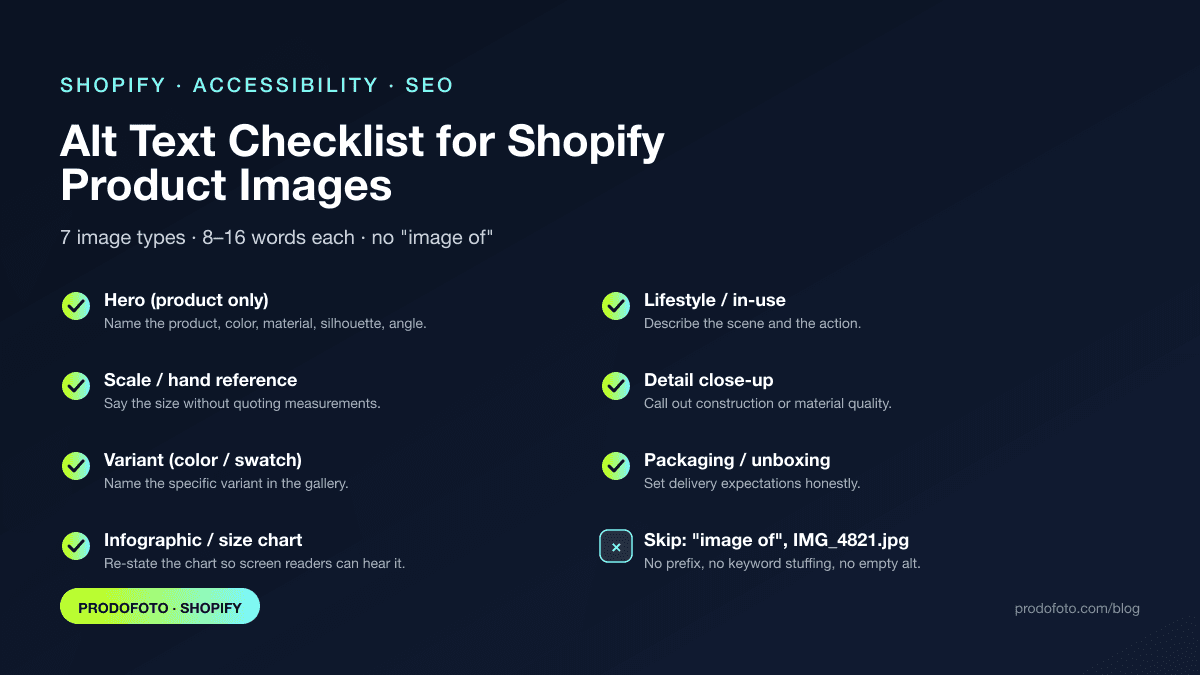
Write product image alt text that names the product, key attributes (color, material, silhouette), and the scene or detail the image actually shows — in roughly 8 to 16 words, no “Image of…” prefix, no keyword stuffing, and never describing things the photo does not really show. Each image in a Shopify gallery gets its own line. Decorative theme graphics use empty alt (alt=""); meaningful product photos never do. The infographic above is the one-screen version of the full checklist below.
Guidance verified against Shopify Help Center alt text documentation, Google Search Central image SEO guidance, and the W3C Web Accessibility Initiative on image alternative text as of May 19, 2026.
Why alt text matters more than merchants think
Alt text does three jobs at once. It is the accessible label that screen readers announce to shoppers using assistive technology. It is one of the strongest on-page signals Google Images and Google Shopping use to understand what a product photo shows. And in 2026 it is one of the inputs AI shopping agents read when they summarize a product in chat. One short sentence per image moves all three needles at once.
Shopify exposes a dedicated alt-text field on every product image. The Shopify Help Center documentation on adding alt text describes the field and recommends a clear description of what is shown. Google's Google Images SEO best practices calls out descriptive alt as a ranking input. The W3C Web Accessibility Initiative tutorial on images gives the principle: alt should convey the same information a sighted user gets from the picture.
The alt text formula for Shopify product photos
A single sentence with three pieces: product (what it is), attributes (color, material, silhouette, variant), and context (the scene, action, or detail visible in this specific image). Front-load the product so screen-reader users hear the most important word first. Keep punctuation minimal.
Example for a hero photo: “Tan and white leather low-top sneaker with white rubber sole, shot from the side on a neutral background.” Example for a lifestyle photo of the same product: “Woman lacing tan and white leather sneakers on a sunlit polished concrete studio floor before a casual walk.” Same product, different sentence, because the image shows different information.
The Shopify alt text checklist by image type
The infographic at the top of this article condenses this table into one screen. Use it as a hand-off to a teammate; use the table below when you are actually filling out the alt field. Each row is one image in the standard Shopify product gallery sequence.
| Image type | Skip this alt | Write this alt | Why |
|---|---|---|---|
| Hero (product-only) Identifies the SKU on Shopify, Google Shopping, and AI shopping agents. | image1.jpg | Tan and white leather low-top sneaker, white rubber sole, side profile on neutral background | Names the product, color, material, silhouette, and angle — the words a shopper would type. |
| Lifestyle / in-use Shows context, scale, and use case. | Person wearing shoes | Woman lacing tan and white leather sneakers on a polished concrete studio floor before a casual walk | Describes the scene and the action while keeping the product name front-loaded. |
| Scale / hand reference Helps the buyer judge size without measurements. | Holding the product | Hand holding the tan and white leather sneaker to show it is roughly the length of an adult forearm | Tells a screen-reader user the same thing a sighted user infers visually. |
| Detail close-up Communicates material quality and construction. | Close up of shoe | Close-up of double-stitched leather upper and reinforced rubber toe cap on the tan and white sneaker | Calls out the construction details that justify the price. |
| Variant (color/size swatch) Disambiguates color or finish variants in the gallery. | Sneaker color option | Tan and white colorway of the low-top leather sneaker (also available in stone and forest) | Names the specific variant; mentioning siblings improves long-tail discovery. |
| Packaging / unboxing Sets delivery expectations and reduces 'looked different' returns. | Box | Charcoal sneakers nested in a kraft shoe box with a tissue paper wrap and a brand thank-you card | Captures what arrives — useful for gifting search and for accessibility. |
| Infographic / size chart Conveys data inside an image. | Size chart | Size chart for the leather low-top sneaker: US men 7 through 13, with foot length in centimeters | Re-states the chart in text so the information is not lost to screen-reader users. |
If you are still planning the gallery itself, the AI shopping agent image readiness checklist pairs naturally with this guide — same six-image set, just from the agent side.
Filenames are part of the alt text job
Google's image SEO guidance explicitly calls out filenames as a signal. IMG_4821.JPG tells Google nothing. tan-white-leather-low-top-sneaker-side.webp tells Google the same thing your alt text does, before the image is even decoded. Rename files before uploading; Shopify keeps the filename as part of the CDN URL.
For the broader file-naming, image-size, and Google Shopping parity story, see the Google Shopping image optimization guide.
Six common alt text mistakes Shopify merchants make
- Stuffing keywords until the sentence stops being a sentence. Strings like "shoes sneakers footwear best leather low top buy online" trip both screen readers and modern image search. Write the way a person would describe the photo to a friend, then check that the product name is in there once.
- Reusing the same alt text on every image in the gallery. Each image earns its own alt text because each image shows something different. Identical alt across six gallery photos signals low quality to Google Images and forces assistive tech to repeat the same sentence.
- Starting with "Image of" or "Picture of". Screen readers already announce that the element is an image. Cut the prefix and put the product name first.
- Leaving alt empty on meaningful product photos. Empty alt (alt="") is correct only for purely decorative images. Hero, lifestyle, detail, and packaging photos all carry meaning and need descriptive alt.
- Describing the AI scene as if it were a real photoshoot. If the model, hand, or environment was generated, do not write alt text that implies a documented event ("our team photographed this on location in Kyoto"). Describe what is shown without inventing provenance.
- Forgetting variants and swatches. Variant images get the least attention and the worst alt text. Name the variant explicitly so search and screen readers can both follow the gallery.
The AI lifestyle photo honesty rule
AI lifestyle photos are now Shopify-safe — see why AI-generated product photos are now Shopify-safe and what AI lifestyle product photos actually are. Alt text has to keep up with that reality. The rule is simple: describe what is shown, not what was staged.
That means alt text on an AI lifestyle shot should still name the real product accurately (color, label, packaging — anything the buyer will compare against the delivered item), and should describe the visible scene without inventing provenance. Write “Tan and white leather sneaker styled on a polished concrete studio floor.” Do not write “Customer photo of our sneakers at her cabin in Vermont.” The first is honest description; the second is fabricated attribution.
Three quick checks before publishing alt text on any AI lifestyle shot:
- Product attributes (color, material, label, included accessories) match the real SKU exactly.
- Alt text describes the visible scene, not a story about how the photo came to exist.
- No claims the photo cannot back up (locations, customer testimonials, professional photographer credits).
Where alt text actually lives in Shopify
- Product images:Admin → Products → pick a product → click an image in Media → Edit alt text. One field per image.
- Collection images:Admin → Products → Collections → pick a collection → collection image alt field in the right rail.
- Theme images:Online Store → Themes → Customize → section image blocks have alt text inputs. Decorative dividers and patterns should use empty alt; hero and editorial images should be described.
- Blog post images:Online Store → Blog posts → pick a post → insert/edit image → alt field.
- Variants:Variant images inherit the parent product's media library, so set variant-specific alt at the image level for the photos that represent each color or finish.
Measurement plan
You can't feel an alt-text change in conversion overnight, but you can measure the surfaces it affects:
- Google Search Console— filter by Search type → Image. Watch impressions and CTR on product URLs after a rewrite pass.
- Google Merchant Center diagnostics — confirm no “image_link missing” or descriptive attribute warnings on items you touched.
- Accessibility audit— run Lighthouse or axe DevTools on the top 10 product pages and resolve any “Image elements do not have [alt] attributes” failures.
- Agentic traffic — tag inbound referrers from AI shopping agents in GA4 and compare product surfacing before and after the rewrite.
Pair this with the broader Shopify product photography conversion checklist so the alt-text fix lands inside a full image program rather than as a one-off.
FAQ
How long should alt text be on a Shopify product image?
Aim for roughly 8 to 16 words — long enough to name the product, color, material, and context, short enough that a screen reader does not stall. The WAI guidance is to convey the same information a sighted shopper gets, not to fill a character budget.
Where do I actually add alt text inside Shopify?
Open the product in Shopify admin, click an image in the Media section, and use the Edit alt text option (the pencil / 'Add alt text' link on the image). Theme banners, collection images, and blog images each have their own alt fields in their respective editors.
Should I include the brand name in every image's alt text?
Include it on the hero image. On secondary images, the product name is enough — repeating the brand on every photo crowds out the more specific details (color, scene, detail) that actually help search and accessibility.
Does alt text matter for AI shopping agents and ChatGPT shopping?
Yes. AI shopping agents read alt text, surrounding copy, and structured data to summarize products in chat answers. Descriptive alt that names color, material, and use case is one of the cheapest things a Shopify merchant can do to improve agent visibility.
Is it safe to use AI-generated alt text?
AI drafts are fine as a starting point, but a merchant should review every alt line against the actual photo. Auto-generated alt commonly invents details ("in a beach setting") or mislabels colors. Treat the AI output as a first pass, not the final answer.
Generate the lifestyle photos this checklist describes
Alt text only helps when there is a strong image to describe. Prodofoto turns a single clean product photo into multiple Shopify-ready lifestyle variants, so you can fill out a six-image gallery — and write honest, specific alt text for each — without booking a new shoot. For a deeper walkthrough, read how to generate AI lifestyle product photos in 60 seconds.