Outdoor & Garden
AI Product Photography for Outdoor & Garden Products on Shopify
Outdoor and garden shoppers buy context, not just products. A patio chair shown on a plain white background tells you nothing about how it feels in a real backyard. AI generates that context — the garden setting, the seasonal light, the scale reference — in 60 seconds for under $1 per product. No outdoor location. No rescheduled shoots because of rain.
By LinkedIn: Brian Chen • 8 min read• Published June 30, 2026

Quick Answer
Outdoor and garden stores on Shopify convert at 1.3–2.2%during peak season. The three gaps killing conversions are scale ambiguity (shoppers can't judge dimensions from a plain product shot), missing seasonal context, and the cost of outdoor location photography ($300–600/day). AI generates outdoor lifestyle scenes, scale references, and seasonal contexts from a single product image for under $1 per product in 60 seconds.
Why Outdoor & Garden Photography Is Different
Most product categories can be photographed in a studio. Outdoor and garden products cannot — or at least, they shouldn't be. A garden bench shot in a white-walled studio tells a shopper nothing about how it looks in an actual garden. The context is the product.
The scale problem.A planter that's 18 inches tall can look identical to a 10-inch pot in a product shot. Garden furniture dimensions are notoriously hard to judge from plain cutout photos. This is not an abstract complaint — scale misjudgment is the #1 driver of returns in outdoor furniture and large planters. Shoppers need a reference: hands, a seated figure, a plant at recognizable height. Traditional photography requires a model or a location shoot to get that reference. AI generates it from the product photo you already have.
Seasonal context dependency. Garden products are seasonal. A patio heater photographed under bright summer sun looks wrong in October. A raised garden bed shown empty with bare soil doesn't sell seeds and bulbs in spring. The image has to match the buyer's season. With traditional photography, each seasonal refresh is another location, another photographer, another invoice. For stores that do 60–70% of their revenue in a 4–5 month spring-summer window, having summer-only photos all year is real money left behind.
Outdoor location cost. Getting the right outdoor setting — a lush residential garden, a styled patio, a well-maintained park — is not free. Private garden locations run $300–600/day before you add the photographer. Weather introduces another variable: a forecast that looked like sunshine can turn into an overcast reschedule. AI generates any outdoor context from the product photo without booking a location or watching the weather app.
| Photography Challenge | Traditional Photography | AI Photography |
|---|---|---|
| Outdoor lifestyle context (garden, patio, backyard) | $300–600/day location fee before adding photographer; weather-dependent | AI generates any outdoor context from a single product photo in 60 seconds |
| Scale reference (person, hands, familiar objects) | Requires a model or additional location elements; adds cost and scheduling complexity | AI adds accurate scale references to generated scenes without a model |
| Seasonal context (spring planting, summer entertaining, autumn harvest) | New location shoot per season; 60–70% of garden revenue depends on peak-season imagery | Generate any season from the same product photo — spring, summer, autumn in 60 seconds each |
| Material detail (teak grain, terracotta texture, galvanized finish) | Controlled studio macro setup required; outdoor light is too variable | AI renders material textures with studio-grade precision from a standard product shot |
| Multiple product arrangements (planter + plant + accessories) | Each combination requires physical setup, styling, and photographer time | AI generates any arrangement as a single lifestyle scene from individual product photos |
| Cost per SKU (full image set) | $300–800 per product including location, photography, and editing | Under $1 for up to 9 lifestyle images — no location, no weather dependency |
Sources: Blend Commerce: Ecommerce Conversion Rate Benchmarks 2026, Baymard Institute, EasyApps: Shopify Gardening Ecommerce Guide 2026
5 Image Types Every Outdoor & Garden Listing Needs
Outdoor shoppers research carefully before buying. They zoom, compare, and imagine the product in their specific space. Each image type below answers a different question a garden shopper asks before clicking Add to Cart.
Outdoor Lifestyle Scene
The product in an actual garden, patio, or backyard setting. Lush greenery, natural light, contextual props (decorative stones, planters, outdoor furniture). This is the image that makes a shopper say 'that would look good in my garden.' White backgrounds don't answer that question.
Scale Reference Shot
The product next to a human hand, a seated figure, a recognizable plant, or a standard-size object. Eliminates the dimension uncertainty that drives returns for large planters, garden furniture, and outdoor decor. If a shopper misjudges the size, you pay for the return.
Material / Texture Close-Up
A tight crop showing the grain of teak, the glaze of ceramic, the weave of rattan, or the finish of galvanized steel. Material quality is a major purchase driver for outdoor products. Shoppers pay more for products they can visually feel — and they can only feel material quality through close-ups.
Seasonal Context Shot
The same product in the season relevant to the buying moment. A raised garden bed shown with spring seedlings in March. A patio heater surrounded by autumn foliage in October. A decorative planter filled with summer blooms in June. Seasonal alignment between the image and the buyer's current context boosts conversion.
White-Background Hero
Required for Google Shopping, Google Merchant Center, and most garden marketplaces. The clean, center-framed cutout shows the product accurately and is the non-negotiable baseline. Start here, then add context.
AI Photography by Garden Product Type
Different outdoor product sub-categories have different photography priorities. Here's what works by product type — and which shot you can't skip.
Garden Furniture (Benches, Chairs, Tables)
Photography challenge
Scale is ambiguous without a person; bare studio shots don't show how furniture fits into an actual outdoor space; material durability needs to read visually
AI approach
AI generates full patio arrangements with scale references, backyard lifestyle scenes with contextual greenery and decking, and material close-ups showing wood grain or metal finish details
Must-have shot
Full patio lifestyle scene + human scale reference + material close-up
Planters & Decorative Pots
Photography challenge
Size is constantly misjudged from cutout shots; groupings of different sizes sell better than single-planter shots; ceramic and terracotta textures need macro precision
AI approach
AI generates grouped planter arrangements with varied heights and plantings, outdoor lifestyle scenes with lush greenery, and texture close-ups showing glaze, matte finish, or terracotta grain
Must-have shot
Grouped arrangement with plants + texture close-up + scale reference
Garden Tools & Accessories
Photography challenge
Tools look generic and interchangeable in plain shots; quality differences in steel, handle grip, and finish are invisible without close-ups; in-use context shows purpose
AI approach
AI generates in-garden action contexts (trowel in a garden bed, pruning shears near a rose bush), flat-lay arrangements with complementary tools, and detail close-ups showing blade finish and handle quality
Must-have shot
In-use context scene + detail close-up showing quality + flat-lay with complementary tools
Seeds, Bulbs & Grow Kits
Photography challenge
The product is small and unexciting on its own; shoppers need to visualize what grows; packaging photography doesn't convey the end result
AI approach
AI generates 'what it grows into' lifestyle scenes: seed packets photographed next to a lush plant version of the end result, grow kits shown with thriving seedlings, bulbs staged next to the flower they produce
Must-have shot
End-result lifestyle scene + packaging close-up + in-garden planting context
Outdoor Lighting & Decor
Photography challenge
Solar lights and lanterns need nighttime or dusk context to show their appeal; wind chimes and decor pieces need atmospheric outdoor settings; scale is often unclear
AI approach
AI generates dusk and evening garden contexts showing lit solar lights, pathway lighting scenes with warm amber glow, and outdoor decor arrangements with atmospheric lighting and garden surroundings
Must-have shot
Evening/dusk lifestyle scene showing product lit + daytime scale reference + material detail
| Product Type | Must-Have Shot | Conversion Priority |
|---|---|---|
| Garden furniture | Full patio scene + scale reference | Very high — context drives the 'I want that' moment |
| Planters & decorative pots | Grouped arrangement + texture close-up | High — size misjudgment drives returns |
| Garden tools & accessories | In-use scene + quality detail | Medium — differentiates from generic alternatives |
| Seeds, bulbs & grow kits | End-result lifestyle scene | High — the product itself is unexciting; the outcome is everything |
| Outdoor lighting & decor | Evening/dusk lit scene | High — product appeal is invisible in daytime cutout shots |
Sources: Market Research Future: Garden Products Market 2035, Eevy AI: Shopify Conversion Rate Benchmarks 2026
Before & After: The Context Gap
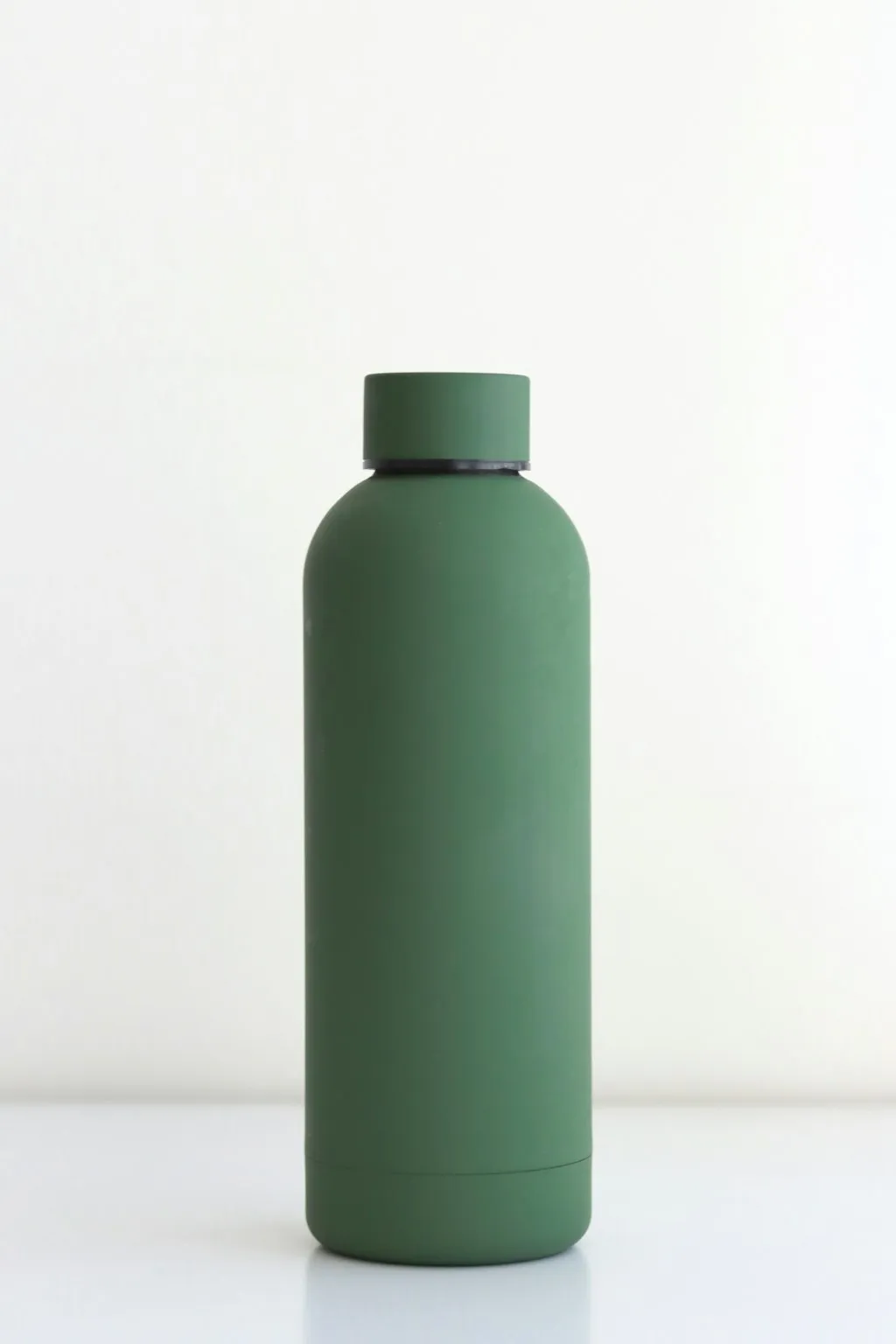
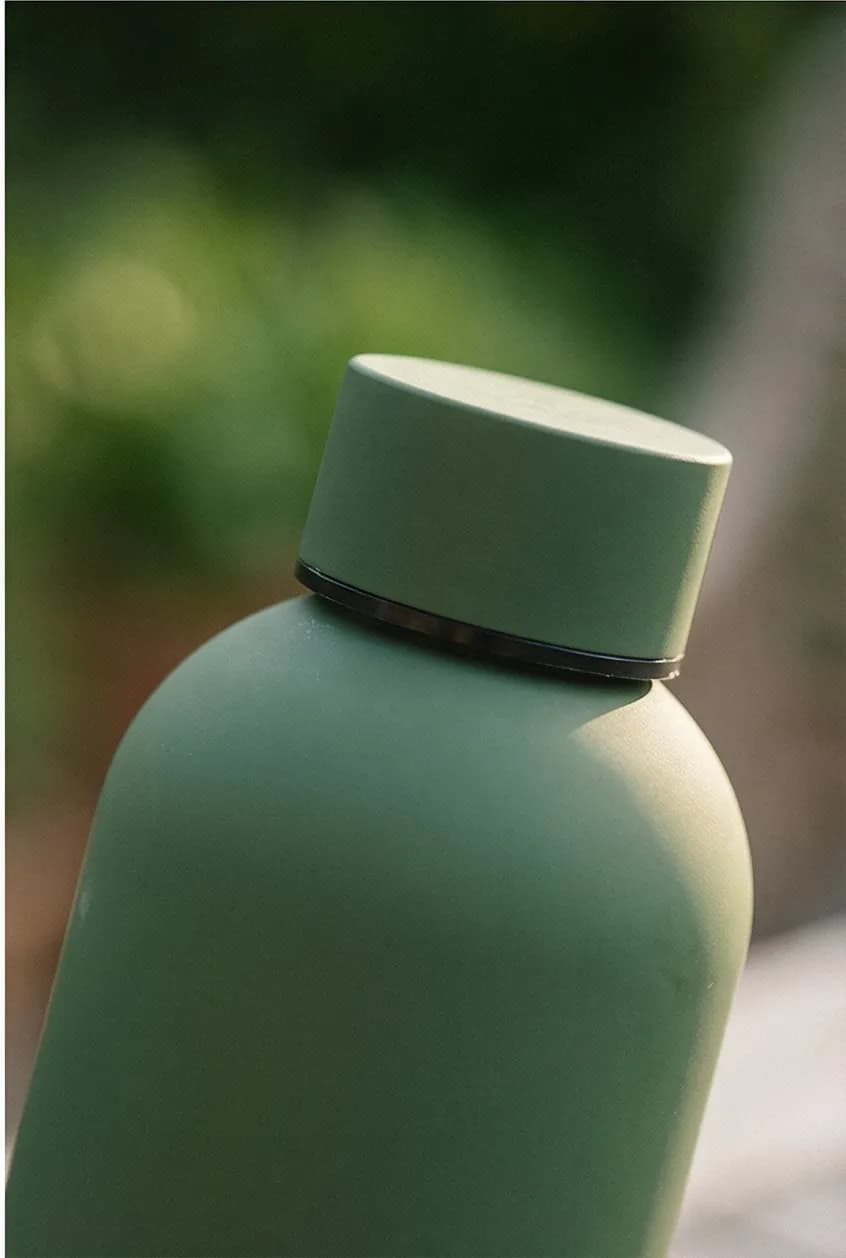
Outdoor products have one of the widest context gaps in ecommerce. A plain white-background shot of a stainless steel water bottle tells you it exists. The same bottle photographed on a weathered wooden garden table next to pruning shears, a trowel, and fresh herbs — that tells you it belongs in a specific outdoor life.
The water bottle below went from a neutral product shot to a full garden lifestyle context in one generation. Same product. The image on the right answers "when do I use this and where does it fit?" without a word of copy.
How Outdoor Brands Use Prodofoto
Prodofoto pulls your products directly from your Shopify catalog. No uploading files. No prompting. For a garden store with 30 SKUs, the workflow that used to require a location scout, a photography day, and weeks of editing now takes about 30 minutes.
Select your garden product from the Shopify catalog
Prodofoto connects to your Shopify store and shows your products. Pick the planter, tool, outdoor furniture piece, or garden decor item you want to photograph. Your existing product images are already there.
Choose Lifestyle, Product-Only, or On-Model
Lifestyle mode generates the outdoor gardens, patio scenes, and backyard settings. Product-Only generates clean, minimal catalog shots on elegant surfaces for marketplaces. On-Model generates the product with AI models for social ads showing products in use.
Generate 4 photos in 60 seconds
One click generates 4 unique lifestyle variants. Each is a different scene composition, a different seasonal context, a different outdoor setting. You get a portfolio of options, not a single shot.
Edit to adjust the scene, scale reference, or seasonal context
If a generation shows the wrong season, or places the scale reference awkwardly, use Prodofoto's natural-language editing to adjust. 'Show the planter in a spring garden bed with seedlings' updates the image without regenerating from scratch.
Publish directly to your Shopify product listing
One click publishes the image directly back to the Shopify product page. No downloading, no re-uploading. The image goes live where shoppers see it — spring context in spring, summer context in summer.
A garden store with 30 SKUs would traditionally need 2–3 location shoot days at $600–$1,200 each to build a full lifestyle image library — and those shots only work for one season. With Prodofoto: 30 products × 4 photos each = 120 lifestyle images, across any season, at under $1 per generation. See the full cost breakdown.
Turn One Garden Product Photo Into a Full Seasonal Gallery
Prodofoto generates 4 lifestyle images per product in 60 seconds. Spring gardens, summer patios, autumn harvest scenes — all from your existing Shopify catalog. Under $1 per product. No location fee. No weather delay.
Frequently Asked Questions
Can AI generate outdoor lifestyle photos without an actual garden or outdoor location?
Yes. Upload a clean photo of your garden product on a white or neutral background. AI generates realistic outdoor scenes around it: garden beds with lush plantings, patio arrangements with natural light, backyard setups with gravel paths and greenery. You get any outdoor context you need without renting a location or waiting for the right weather.
How many product photos does an outdoor or garden listing on Shopify need?
Aim for 6–8 images per SKU: a clean white-background hero, an outdoor lifestyle scene showing the product in context, a scale reference shot (with hands or a familiar object for dimension), a material detail close-up (wood grain, ceramic texture, metal finish), a seasonal context image, and an in-use shot. High-ticket items like garden furniture benefit from additional arrangement shots showing the product as part of a full outdoor space.
How do I show the real size of large outdoor products without a photographer or location?
Scale ambiguity is the #1 return driver for outdoor furniture and large planters. AI solves it by generating scale reference scenes: a garden bench shown with a seated figure, a raised bed shown with plants growing at full height, a planter next to a recognizable everyday object. You provide the clean product photo; AI builds the dimensional context around it. Returns drop when customers can accurately judge size from the listing image.
What are the specific photography challenges for outdoor and garden products?
Three challenges define this category: scale ambiguity (dimensions are hard to judge without a reference), seasonal context (a patio heater photographed in summer light or a planter shown in a snowscape both look wrong for the buyer's season), and outdoor location cost ($300–600/day for a private garden or park setting). AI solves all three: it generates outdoor contexts, handles scale references, and creates any seasonal scene without a physical location.
What conversion rate should outdoor and garden Shopify stores expect?
Outdoor and garden stores on Shopify convert at 1.3–2.2% during peak season (spring and summer), dropping to 0.8–1.2% off-season. The top-performing stores hit 3%+ by combining lifestyle imagery in actual garden contexts, scale references that cut returns, and seasonal photo refreshes timed to the buying moment. Image quality is the single highest-leverage variable in that gap.
How should I photograph seasonal garden products for Shopify throughout the year?
Garden products live and die by season. A seed packet photographed in a spring planting context outperforms a plain white-background shot during spring buying season. With traditional photography, seasonal refreshes mean scheduling a new shoot for each season. AI generates any seasonal context — spring beds with fresh soil, summer gardens in bloom, autumn harvest arrangements — from a single product photo. One photo, four seasons, 60 seconds each.
Can Prodofoto generate lifestyle photos for outdoor and garden products on Shopify?
Yes. Prodofoto connects directly to your Shopify catalog — no uploading — and generates 4 lifestyle photos in about 60 seconds per product. For garden and outdoor products, it generates patio settings, garden bed contexts, outdoor flat lays with botanical elements, and lifestyle scenes showing products in use. One click. Under $1 per product. Publish directly back to the Shopify product listing.
References
- Blend Commerce: Ecommerce Conversion Rate Benchmarks 2026
- EasyApps: Shopify Gardening Ecommerce Strategy Guide (2026)
- Market Research Future: Garden Products Market Size & Forecast to 2035
- Eevy AI: Shopify Conversion Rate Benchmarks by Industry 2026
- Baymard Institute: Ecommerce Checkout Usability & Image Quality Research
- Google Merchant Center: Product Image Requirements
- GrabOn: Ecommerce Product Photography Statistics 2026
Keep reading