AI Photography Tools
Pomelli Photoshoot for Shopify Sellers: What Google's New AI Tool Can (and Can't) Do
Google launched Pomelli Photoshoot on February 19, 2026. It is a free AI tool that turns product photos into styled lifestyle shots using Gemini-based image generation. For Shopify sellers specifically, the tool has real strengths and real gaps. Here is what it does, how the workflow actually plays out, and where it falls short for anyone running a Shopify store.
By LinkedIn: Brian Chen • 8 min read• Published February 20, 2026

TL;DR
Pomelli Photoshoot is a free Google Labs tool that generates AI lifestyle product photos. It is genuinely impressive for a free tool, and the Google brand backing gives it credibility. But it is not a Shopify app. Using it means leaving your store, setting up a separate brand profile, generating images on an external site, downloading them, and re-uploading to Shopify manually. It is also only available in the US, Canada, and Australia. For Shopify sellers who want product photography inside their store workflow, it is not a replacement for a Shopify-native photography app.
What Pomelli Actually Is
Pomelli is a free AI marketing platform from Google Labs, available at labs.google.com/pomelli. It is not a Shopify app. It is not a Chrome extension. It is a standalone web application built for small and medium businesses across all platforms and industries.
The tool has several features. Photoshoot (launched February 19, 2026) generates styled product photos from your existing images. Animate turns still images into short videos using Veo 3.1. There are also campaign creation tools for social media posts, email headers, and marketing materials. Everything runs on Google's “Nano Banana” model, which is based on Gemini image generation.
The target audience is broad. Google positions Pomelli for jewelry makers, coffee shops, yoga studios, pet groomers, and basically any small business that needs marketing visuals. It is a general-purpose marketing tool, not a product photography tool built for ecommerce platforms.
How Pomelli Photoshoot Works
Before you can generate anything, Pomelli requires you to set up something called “Business DNA.” This is a brand profile that includes your business name, description, target audience, brand colors, and visual style preferences. The idea is that every image Pomelli generates stays consistent with your brand identity.
Once Business DNA is configured, you upload a product photo. Pomelli then generates styled variants of your product in different settings and compositions. You can provide style references, adjust prompts, and iterate on results. The generated images can be downloaded as individual files.
The Animate feature uses Google Veo 3.1 to turn still product images into short video clips. The campaign tools can package your generated images into social media posts or ad creatives. It is a full marketing suite, not just a photo generator.
The Shopify Workflow Gap (6+ Steps Outside Your Store)
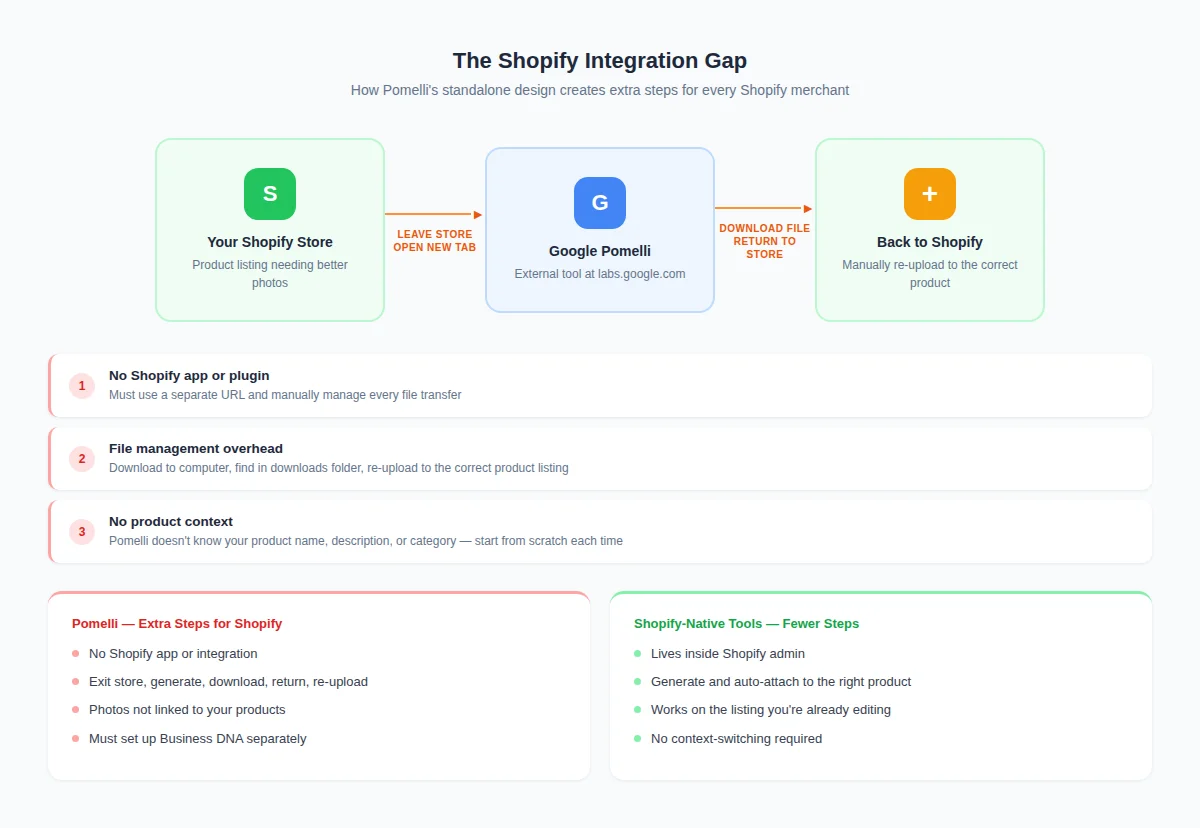
This is where it gets real for Shopify sellers. Using Pomelli to update your product pages means leaving your store entirely. Here is the actual workflow.
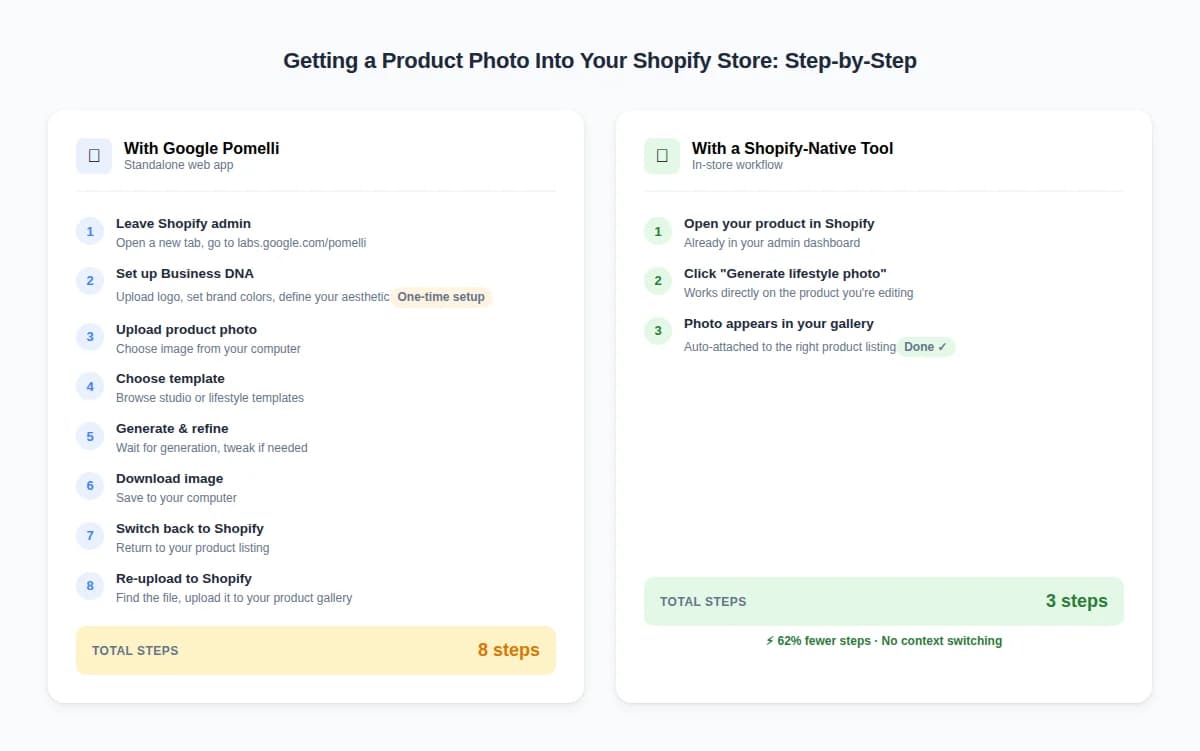
- 1Leave your Shopify admin and navigate to labs.google.com/pomelli
- 2Set up your Business DNA profile (brand colors, style, audience) if you have not already
- 3Upload your product photo to Pomelli (even though it already lives on Shopify)
- 4Generate images and iterate until you get results you like
- 5Download the generated images to your computer
- 6Go back to your Shopify admin and re-upload each image to the correct product listing
Multiply that by 50 products. Or 200. It gets old fast.
A Shopify-native tool pulls images directly from your product page, generates variants, and publishes them back to your listing without ever leaving your store admin. That is a fundamentally different workflow.
Only Available in 3 Countries
Pomelli is currently available in the United States, Canada, and Australia. That is it.
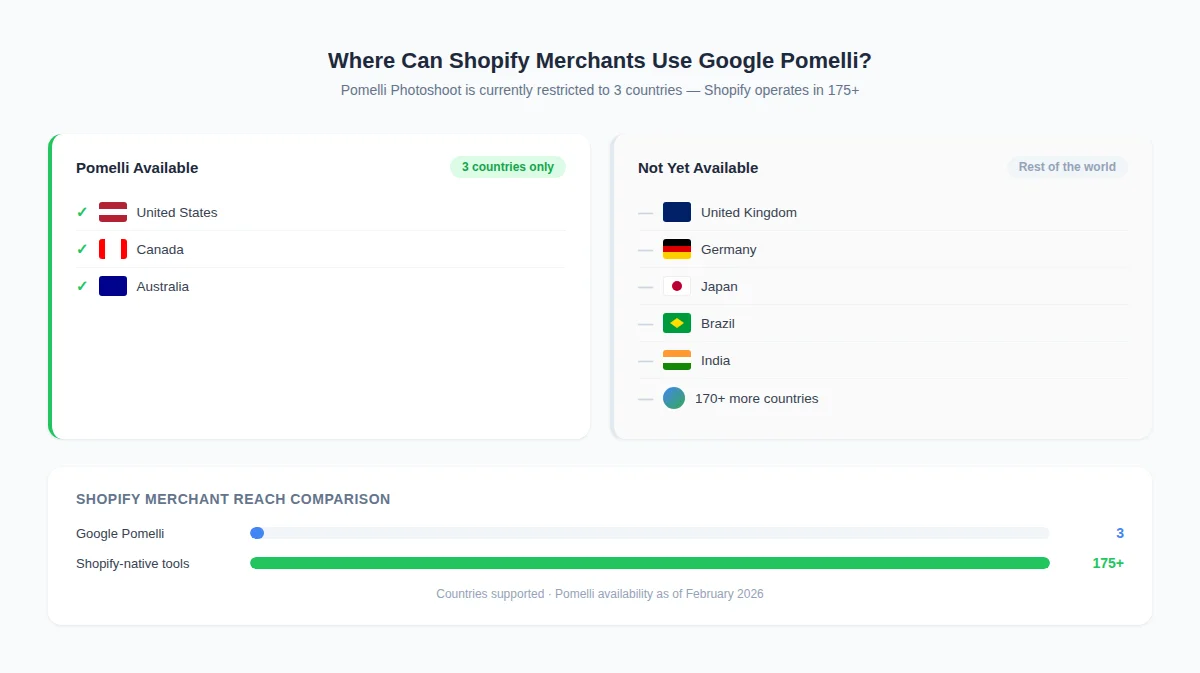
Shopify has merchants in over 175 countries. If you are running a store from the UK, Germany, India, Japan, Brazil, or anywhere outside those three countries, Pomelli is not an option. Google has not announced a timeline for expansion.
This matters more than it might seem. Shopify's cross-border commerce tools mean many merchants serve global customers from non-US locations. A tool restricted to 3 countries leaves the majority of the Shopify ecosystem out.
Pomelli vs Shopify-Native Tools (Feature Comparison)
This is not a photo quality comparison. Both approaches use AI image generation and produce solid results. The difference is in the workflow and what fits a Shopify seller's day-to-day.
| Feature | Pomelli (Google Labs) | Shopify-Native App (e.g. Prodofoto) |
|---|---|---|
| Price | Free (Labs phase) | Free tier + paid plans |
| Shopify integration | None (standalone web app) | Direct install from Shopify App Store |
| Product image source | Manual upload required | Pulls from Shopify product page |
| Publish to Shopify | Download + re-upload manually | One-click publish to product listing |
| Bulk generation | One product at a time | Batch across catalog |
| Brand profile setup | Required (Business DNA) | Not required (generate immediately) |
| Video generation | Yes (Veo 3.1 Animate) | No |
| Campaign/social tools | Yes (social posts, ads) | No (focused on product photos) |
| Availability | US, Canada, Australia only | Global |
| Time to first photo | 5-10 min (with Business DNA setup) | ~60 seconds (select product, generate) |
Where Pomelli Genuinely Shines
Give credit where it is due. Pomelli does several things well.
- ✓It is free. During the Google Labs phase, there is no cost. For a small business testing AI photography for the first time, the barrier to entry is zero.
- ✓Google brand trust. For merchants who are skeptical about AI tools from unknown startups, the Google name carries weight. That matters for adoption.
- ✓Marketing suite, not just photos. The Animate feature (Veo 3.1 video), campaign tools, and social media templates go beyond what most product photography apps offer. If you need social ads and video alongside product photos, Pomelli bundles that.
- ✓Business DNA is smart. The brand profile concept means generated content stays visually consistent. For businesses running campaigns across channels, that consistency saves time.
- ✓Great for non-ecommerce SMBs. A yoga studio that needs social posts. A coffee shop that wants a menu graphic. A pet groomer creating a flyer. Pomelli fits these use cases well because they are not tied to a specific platform workflow.
What Shopify Sellers Specifically Need More
Shopify merchants have a specific workflow. You manage products in your Shopify admin. You need images on your product pages. You care about gallery sequence, image quality at specific dimensions, and how fast you can update 50 listings. Pomelli was not built for this workflow.
- →In-store workflow. Selecting a product from your catalog and generating images without leaving the admin saves real time per product. Across a catalog, that time adds up.
- →Direct publishing. Generated images should go straight to the product listing. Not to a download folder. Not to a second upload form. Straight to the listing.
- →Bulk generation. Pomelli handles one product at a time. If you have 100 products that need lifestyle photos, you are uploading each one individually to an external site. Shopify-native apps can process batches.
- →No setup friction. Business DNA is useful for campaigns, but for product photography you just want to pick a product and generate. The 5-10 minutes of initial profile setup is friction Shopify sellers do not need for the photo use case.
- →Global availability. If your store ships worldwide and your team is distributed, a tool locked to 3 countries creates operational gaps.
For a deeper look at how AI product photography fits into the Shopify workflow specifically, we wrote a full guide.
Generate Product Photos Without Leaving Shopify
Prodofoto pulls your product image directly from Shopify, generates 4 lifestyle photos in 60 seconds, and publishes them back to your listing. No external sites. No downloads. No re-uploads.
Frequently Asked Questions About Pomelli
What is Google Pomelli?
Pomelli is a free AI marketing platform from Google Labs (labs.google.com/pomelli). It generates product photos, animated videos, and marketing campaigns using Gemini-based image generation. It launched its Photoshoot feature on February 19, 2026.
Is Pomelli free to use?
Yes. Pomelli is currently free during its Google Labs experimental phase. There is no pricing announced for future paid tiers yet. You need a Google account to sign in.
Does Pomelli integrate with Shopify?
No. Pomelli is a standalone web app at labs.google.com/pomelli. It does not connect to Shopify. You would need to download generated images and manually re-upload them to your Shopify product listings.
What countries can use Pomelli?
Pomelli is currently available in the United States, Canada, and Australia only. Merchants outside these three countries cannot access the tool.
What is Pomelli Business DNA?
Business DNA is Pomelli's brand profile system. Before generating images, you set up your brand's colors, style, tone, and target audience. Pomelli uses this profile to keep generated content consistent with your brand identity.
Can Pomelli replace a Shopify product photography app?
For basic image generation, Pomelli produces solid results. But it lacks Shopify integration, bulk generation, and direct publishing to product pages. Shopify-native apps like Prodofoto handle the full workflow inside your store without tab-switching or manual downloads.
What is the difference between Pomelli and Prodofoto?
Pomelli is a broad marketing platform (photos, video, campaigns) available as a standalone web app. Prodofoto is a Shopify-native app focused specifically on product photography: select a product, generate 4 photos in 60 seconds, publish directly to your listing. Different tools for different workflows.
References
- Google Pomelli (labs.google.com/pomelli) - Official Pomelli platform
- Google Blog: Introducing Pomelli - Google's announcement post
- Baymard Institute: Product Image Gallery UX - Research on product gallery best practices
- Shopify: Product Photography Tips - Shopify's official photography guide
- GrabOn: Online Shopping Statistics 2026 - Consumer behavior and image impact data