Product Photography
How to Create Product Infographic Photos for Your Shopify Listings (No Designer Needed)
LinkedIn: Brian Chen • 8 min read• July 8, 2026

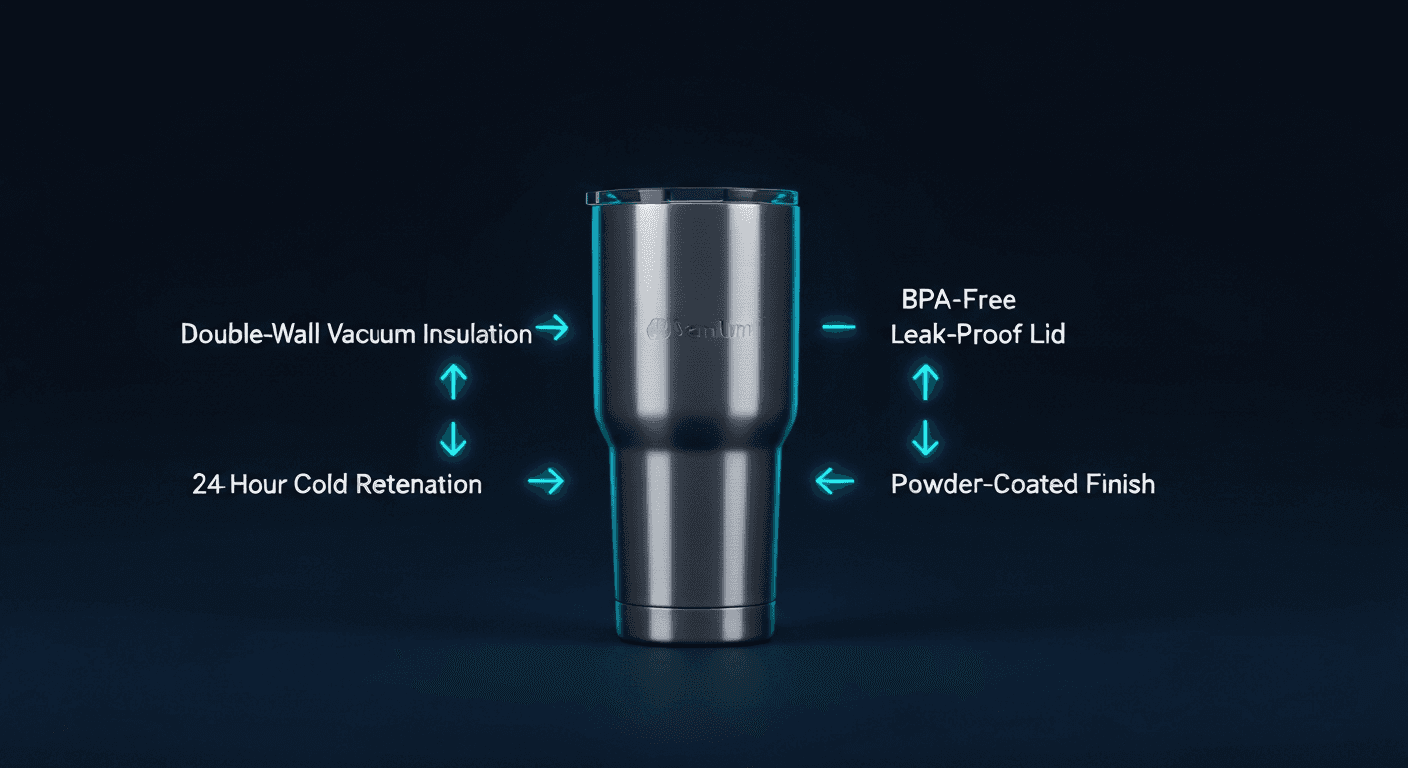
Quick Answer
A product infographic photo is a studio-style image with callout lines and short labels pointing to key product features. They convert better because 73% of buying decisions are made from product images alone — shoppers who can see the specs inside the photo never need to read the description. Prodofoto's Infographic mode generates a full annotated set from any Shopify product photo in under 60 seconds, starting at $1 per product.
Your product page has about three seconds to convince a shopper to keep scrolling. The description, the bullet points, the specs tab — those are for the minority of buyers who have already decided they are interested. The majority make their call from the photos. If your photos only show what the product looks like and not what makes it good, you are leaving half the sale on the table.
Infographic product photos solve this. They are the format you see on the best-selling Amazon listings and on the product pages of DTC brands that have figured out conversion: a clean studio image of the product with labeled callout lines pointing to the features that matter. Double-wall insulation. 600D waterproof nylon. 25mg per serving. Reinforced flatlock stitching. The specs that would otherwise be buried in paragraph four of the product description become the first thing a shopper's eye lands on.
Until recently, creating a quality infographic photo required a graphic designer, stock photography software, and 45 minutes per product. Prodofoto's Infographic mode does it in under a minute with no design skills at all — directly from the product photos already in your Shopify catalog.
What Are Product Infographic Photos?
An infographic product photo combines studio photography with annotated graphic design. The product is centered against a clean, high-contrast background — usually dark or white — and thin lines extend from specific parts of the product to short label text beside each callout point. The result communicates product specifications visually, without requiring the shopper to read anything outside the image.
This format is distinct from lifestyle photos, which show the product in use in a scene. It is also different from white background hero shots, which show the product cleanly but communicate nothing beyond its appearance. Infographic photos are specifically designed to answer the question: why is this product better than the one next to it?
Top-performing listings on Amazon typically include one white background hero, two to three lifestyle shots, and one to two infographic photos. Shopify brands running A/B tests consistently report that adding an infographic image to an existing gallery improves add-to-cart rates without changing anything else on the page.
Why Infographic Photos Outperform Standard Product Shots
The core mechanism is simple: information processing. A shopper viewing your product page is simultaneously evaluating your product and ten competitor products. They are not reading — they are scanning. An infographic photo puts the decision-relevant information (materials, capacity, certifications, key dimensions) inside the scan path rather than below it.
Research from the Nielsen Norman Group on e-commerce scanning behavior consistently finds that shoppers spend more time on images than on any other page element. Body text conversion rates drop sharply after the first 100 words. Product bullet points are read by fewer than 20% of visitors. But an infographic image is parsed in the same scan that processes the product photo — the cognitive cost to the shopper is essentially zero.
The conversion lift is most pronounced in four situations:
- High-consideration purchases — supplements, electronics, outdoor gear — where specs drive the decision
- Category-competitive listings — where many similar products look identical and callouts create differentiation
- Technical products where key features are hidden inside the product and invisible from the outside
- Mobile traffic where small screens make reading descriptions even less likely
5 Elements of a High-Converting Product Infographic Photo
Not all infographic photos convert equally. The format works when all five of these elements are in place.
1. Clean, high-contrast background
The product needs to stand out clearly. Dark backgrounds work well for premium or technical products. White or light gray works for everyday goods. The callout lines need visual separation from the product itself.
2. Callout lines that point to specific product elements
Thin, clean lines extending from a specific part of the product to a label beside it. The lines should feel precise and intentional — pointing to the lid, not the general top of the product. Vague callouts undermine trust.
3. Short, benefit-first label text
Each label should be 3-6 words maximum. Lead with the benefit or spec: "24-Hour Cold Retention" beats "Double Wall Technology." "400-Thread Count Egyptian Cotton" beats "Premium Materials." Specificity is credibility.
4. Consistent visual hierarchy
All labels at the same font size and style. Consistent spacing between callout lines. The eye should move smoothly around the product without visual clutter. A photo with 4 callouts and clean layout outperforms one with 8 callouts that looks crowded.
5. Accurate, verifiable claims
Every callout label must be accurate. Infographic photos that overstate specs or use vague marketing language erode trust and can generate returns. If the callout says "BPA-Free," the product must actually be certified BPA-free. Accuracy is the non-negotiable baseline.
How to Create Product Infographic Photos for Shopify (Step by Step)
Prodofoto's Infographic mode generates finished annotated photos directly from your Shopify product images in five steps. No design software. No manual callout drawing. No per-image file management.
- 1
Install Prodofoto from the Shopify App Store
Add Prodofoto to your Shopify store. It connects to your product catalog automatically — no manual import, no uploading spreadsheets.
- 2
Select a product from your Shopify catalog
Open the Prodofoto dashboard and choose any product. Prodofoto reads the product photo already on your Shopify listing as the base image.
- 3
Choose the Infographic shoot mode
Select 'Infographic' from Prodofoto's five shoot modes. This mode places your product on a clean high-contrast background and generates annotation callouts pointing to its key features.
- 4
Generate your infographic photos in under 60 seconds
Prodofoto creates 4 infographic photo variants. Each shows your product centered with clean feature callout lines and label text overlaid in a style that matches professional studio infographic photography.
- 5
Select your favorites and publish to Shopify
Pick the variants you want and publish with one click. The infographic photos go live on your product page immediately — no design software, no downloading, no uploading.
The total time from opening Prodofoto to having infographic photos live on your Shopify listing is under two minutes for a single product. For a 50-product catalog, you can generate a full set of infographic images in one session using Prodofoto's bulk generation — cycling through products without leaving the dashboard.
Infographic Photos vs White Background vs Lifestyle: Which to Use When
Each image type has a specific job in your product gallery. They are not interchangeable, and the best-converting Shopify listings use all three.
| Image type | Primary job | Best position in gallery | Works best for |
|---|---|---|---|
| White background hero | Show what the product looks like accurately | Image 1 (main) | All products, required for most marketplaces |
| Lifestyle photo | Show the product in context, trigger aspiration | Images 2-4 | Fashion, home decor, food, fitness gear |
| Infographic photo | Communicate specs and differentiators inside the image | Images 3-5 | Electronics, supplements, outdoor gear, technical products |
A common mistake is treating infographic photos as a replacement for lifestyle shots. They serve different psychological functions. Lifestyle photos create desire — they show the shopper a version of themselves using the product. Infographic photos close the rational case — they answer the "but is it actually good?" question that follows initial interest. Both are necessary in most product categories.
When to Prioritize Infographic Photos (and When to Skip Them)
Infographic photos deliver the most lift when a product has meaningful specs that are invisible or non-obvious from standard photos. The stronger your spec story, the more an infographic photo converts.
Use infographic photos for:
- Supplements and wellness products (dosing, ingredients, certifications)
- Electronics and tech accessories (ports, specs, battery life)
- Drinkware and food containers (insulation hours, capacity, materials)
- Outdoor and sports gear (waterproof rating, weight, durability features)
- Apparel with technical features (fabric weight, UPF rating, stretch factor)
- Baby and kids products (certifications, non-toxic materials, safety features)
Lower priority for:
- Pure fashion apparel where aesthetics drive purchase (lifestyle and on-model shots do more work)
- Art prints, posters, and digital goods where the visual IS the product
- Food items where appetite appeal is the primary conversion driver
- Very simple products with no meaningful differentiating specs (a basic tote bag, a plain candle)
Infographic Photo Ideas by Product Category
Here is how infographic callouts translate to specific product types commonly sold on Shopify:
Drinkware and water bottles
Callouts: double-wall vacuum insulation, hours of cold/hot retention, BPA-free lid, capacity (oz), powder-coated finish, dishwasher-safe indicator, carry loop or carabiner clip
Supplements and wellness
Callouts: key active ingredient per serving (mg), third-party tested badge, capsule or serving count, allergen-free status, non-GMO verified, manufacturing standard (GMP)
Technical apparel and activewear
Callouts: fabric composition and weight (gsm), UPF sun protection rating, 4-way stretch, moisture-wicking technology, flatlock stitching, recycled material certification
Bags and backpacks
Callouts: material denier (600D, 900D), waterproof coating, laptop sleeve size, total capacity (liters), padded straps, number of compartments, hidden security pocket
Electronics accessories
Callouts: charging speed (W), compatibility (MFi certified, USB-C PD), cable braid material, connector durability (bend tests), LED indicator, compact dimensions
Generate infographic photos in 60 seconds
Prodofoto's Infographic mode creates annotated product photos directly from your Shopify catalog. No design skills, no software, no manual callout drawing — from $1 per product.
Install Prodofoto FreeFrequently Asked Questions
- What is a product infographic photo?
- A product infographic photo is a studio-style product image with annotated callout lines pointing to key product features or materials, with short label text next to each callout. The goal is to communicate specifications visually inside the photo itself — so shoppers don't have to read the full product description to understand what makes the product valuable. Common on Amazon and Shopify listings for electronics, supplements, apparel, and home goods.
- Do I need design skills or software to create product infographic photos?
- With Prodofoto, no. The Infographic shoot mode generates the full annotated photo automatically from your existing product image. There is no need for Canva, Photoshop, or any external design tool. You select the mode, click generate, and get finished infographic photos in under 60 seconds.
- Which products benefit most from infographic photos?
- Products with meaningful technical specs or material callouts benefit most: supplements and wellness products (ingredient highlights), electronics and accessories (ports, materials, battery specs), apparel (fabric weight, stitching, fit features), home goods (dimensions, materials, certifications), and drinkware (insulation hours, capacity, lid type). Products where the key selling points are invisible or hidden — internal insulation, material quality, construction details — benefit the most because an infographic photo surfaces those details visually.
- How is Prodofoto's Infographic mode different from designing in Canva?
- Canva requires you to manually place the product image, draw callout lines, choose fonts, align text, and export — a process that takes 30-60 minutes per product for non-designers, and longer to do it well. Prodofoto's Infographic mode does all of that automatically in under 60 seconds. It also integrates directly with your Shopify catalog, so there is no file management or tab-switching required.
- Can I control which features are highlighted in the infographic callouts?
- Prodofoto's Infographic mode generates callouts based on the product visual and category. The annotations highlight prominent or distinctive product features that are visible in the product image. For precise control over specific text labels, Prodofoto's AI editing mode lets you modify the generated photo in plain English.
- Are infographic product photos allowed on Shopify and Amazon?
- Yes. Infographic photos are a standard, widely accepted format on both Shopify and Amazon. Amazon explicitly allows infographic images in secondary image slots (images 2 through 9) for most categories. On Shopify, there are no image content restrictions beyond accuracy. The main rule: the callout claims must be accurate and not misleading about the product's actual specifications.
- How much does it cost to generate infographic product photos with Prodofoto?
- Prodofoto costs approximately $1 per product on paid plans. Generating a full set of infographic photos for 50 products costs around $50 — compared to $50-150 per product for a professional graphic designer. The Starter plan at $9.99 per month includes 50 credits, enough for a small to mid-size catalog.
Related guides
- How to Use Prodofoto: A Complete Shopify Setup Guide
- AI Product Photography for Shopify: The Complete Guide
- Best AI Product Photography Tools for Shopify
- How to Bulk Generate Product Photos for Your Shopify Catalog
- Shopify Product Page Optimization Guide
References
- Nielsen Norman Group — How People Read Online: New and Old Findings
- Nielsen Norman Group — F-Shaped Pattern for Reading Web Content
- Amazon Seller Central — Product Photography Guidelines
- Shopify Blog — Product Photography Tips That Drive More Sales
- MDPI Sustainability — Consumer Decision-Making in E-Commerce: The Role of Product Images
- Baymard Institute — Product Image Guidelines for E-Commerce