Kitchenware & Cookware
AI Product Photography for Kitchenware & Cookware Shopify Stores
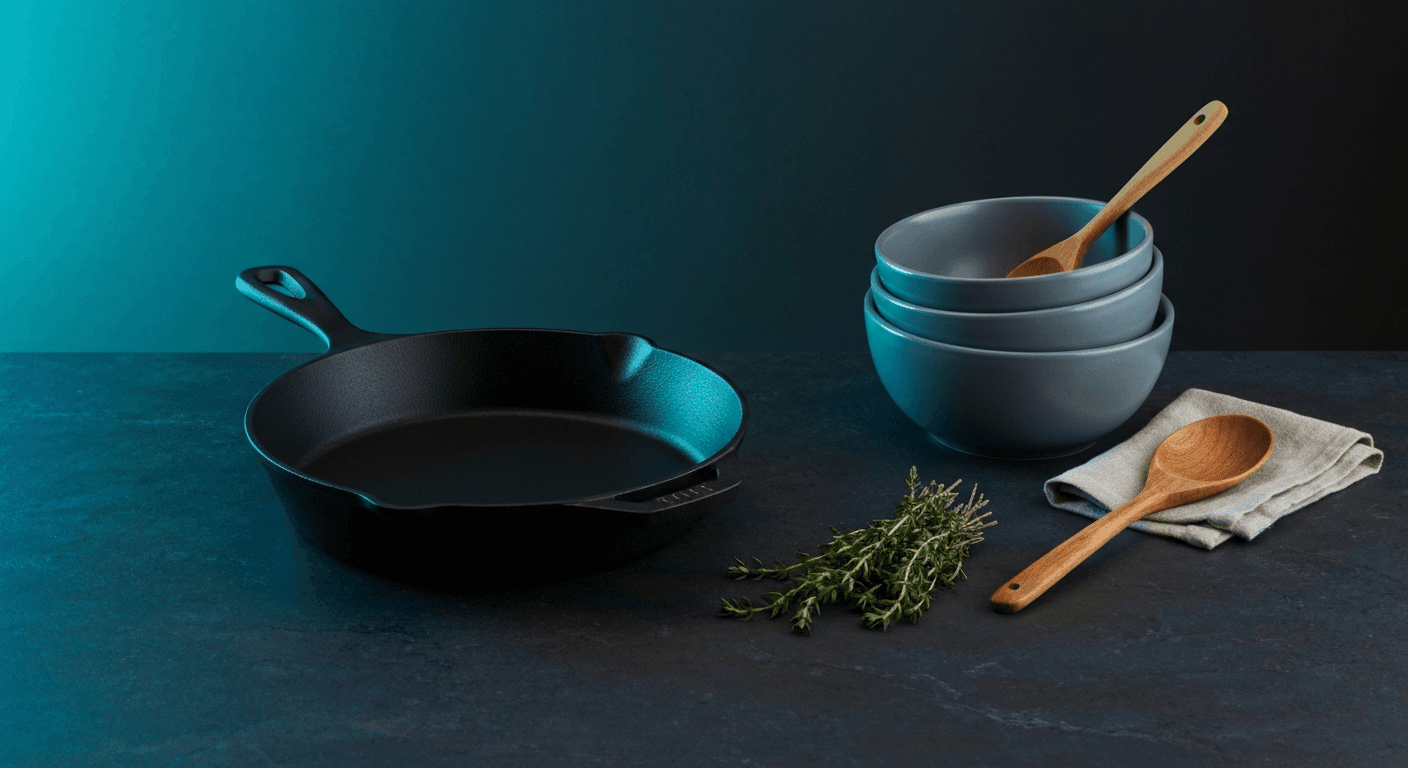
Cookware shoppers judge quality before they read a single spec. They look at the finish, the weight implied by the photo, the way light catches a handle. A blurry or flat studio image sells a pot. A sharp countertop lifestyle scene sells a kitchen. AI generates the full image set for under $1 per product in 60 seconds — no food props, no photographer, no studio booking.
By LinkedIn: Brian Chen • 9 min read• Published July 13, 2026

Quick Answer
Kitchenware and cookware Shopify stores convert at 2.1–3.8% on average. Listings with lifestyle countertop scenes convert up to 40–55% better than white-background-only galleries. A traditional 20-SKU cookware photoshoot costs $15,000–$45,000 including props, studio time, and post-processing. AI generates the same 120 lifestyle and product images for under $1 per product, in 60 seconds each, with no food props, no photographer, and no kitchen set to build.
Why Cookware Photography Is Different
Kitchenware and cookware share a photography problem that most other categories don't have: the product looks almost identical across price points on a white background. A $15 pan and a $150 pan photograph exactly the same way under flat studio lighting. The difference is invisible until you put them in context.
Reflective surfaces are hard. Stainless steel, copper, and ceramic glazes reflect everything around them. A flat studio shot picks up the photographer, the lights, and the ceiling tiles. Getting clean reflections on premium cookware requires purpose-built lighting rigs — polarized light sources, C-stands with diffusion panels, and careful flagging. AI renders these materials with accurate reflections and no visible equipment.
Scale is ambiguous.A 10-inch skillet and a 12-inch skillet look the same size on a white background. Shoppers have no way to judge whether a pan fits their stovetop or a mixing bowl fits their recipe volume until they're holding it — which is when returns happen. Lifestyle scenes with recognizable kitchen props (a wooden spoon, a bunch of herbs, a stovetop) instantly communicate size without text.
Lifestyle props cost money. A hero lifestyle scene for a skillet requires fresh food, herbs, a styled counter, coordinated linens, and a photographer. Perishable food props wilt under studio lights. The setup alone takes an hour. AI generates photorealistic food and kitchen scenes around your product image in 60 seconds, with no perishables, no props budget, and no kitchen set.
| Photography Challenge | Traditional Photography | AI Photography |
|---|---|---|
| Reflective metals and ceramic glazes | Polarized lighting rig, flagging, specialist retoucher | AI renders material accuracy from a standard product image |
| Scale communication | Physical props sourced, styled, and shot in studio | AI generates props in accurate scale within the lifestyle scene |
| Food and ingredient props | Fresh food sourced, staged, shot fast before wilting — $50–$200 per scene | AI generates photorealistic food and garnish props in the scene |
| Seasonal lifestyle refresh | New studio session with seasonal props — $500–$1,500 per shoot | New seasonal context generated in 60 seconds |
| Multiple SKU variants (sizes, colors, finishes) | Separate shoot per variant, consistent lighting difficult to recreate | Each variant generated in the same session at the same cost |
| Cost per SKU (full image set) | $300–$600 per product including studio, food props, and editing | Under $1 for up to 9 lifestyle images per product |
Sources: Baymard Institute: Product Image Quality Research, Shopify Conversion Rate by Industry 2026
5 Image Types Every Kitchenware Listing Needs
Kitchenware shoppers compare options visually before they read specs. Each image type below answers a specific question a cookware shopper asks before clicking Add to Cart.
Clean White-Background Hero
Required for Google Shopping, Amazon, and most kitchen marketplaces. Center-framed, pure white, accurate color and finish. The reference shot — shows the product honestly with no distraction. This is also the input image Prodofoto uses to generate all lifestyle variants.
Countertop Lifestyle Scene
The product on a real-looking kitchen counter, styled with fresh herbs, ingredients, or complementary kitchen tools. Answers 'what does this look like in a real kitchen?' and communicates quality through context. The highest-impact image for cookware conversion — showing a pan full of food outperforms showing an empty pan every time.
Material and Finish Close-Up
A tight shot showing the surface texture, handle attachment, pour spout, or non-stick coating. This is the trust-building shot that answers 'is this actually well-made?' Cookware shoppers at the $50+ price point need to see material quality before they commit. No blurry close-ups — this needs the same sharpness as the hero.
Scale Reference Shot
The product positioned with a recognizable size reference — a stovetop burner, a standard-sized vegetable, a human hand on the handle. Eliminates the most common reason for kitchen product returns: 'it was bigger/smaller than I expected.' Critical for pots, pans, mixing bowls, and bakeware.
In-Use or Plating Shot
The cookware doing what it was built to do — a pan with food cooking in it, a bowl with ingredients being mixed, a pot with steam visible. This image answers 'does this work the way I imagine it working?' and drives the final purchase decision for skeptical shoppers. AI generates photorealistic food and steam scenes without a working kitchen.
AI Photography by Cookware Category
Different cookware and kitchenware sub-categories have different photography priorities. Here's what works by product type — and which shot you can't skip.
Pots, Pans & Skillets
Photography challenge
Reflective stainless steel picks up studio equipment; empty pans look cheap without context; size ambiguity without props; cast iron needs texture and weight to read
AI approach
AI generates stovetop scenes with photorealistic food in the pan, countertop flat lays with fresh ingredients, and cast iron close-ups showing accurate seasoning texture and patina
Must-have shot
Stovetop lifestyle with food + material close-up + scale reference
Mixing Bowls & Bakeware
Photography challenge
Identical-looking products across price points; size confusion between pieces in a set; ceramic glazes reflect poorly under flat lighting
AI approach
AI generates nesting-stack flat lays, countertop baking prep scenes with flour and eggs, and oven-to-table hero shots showing the final result
Must-have shot
Nested set lifestyle shot + ingredient prep scene + glaze detail close-up
Knives & Cutting Tools
Photography challenge
Blade reflection requires specialist photography lighting; scale and balance are invisible without context; handle material needs tactile quality to read in photos
AI approach
AI generates cutting board prep scenes with fresh vegetables, chef-knife flat lays on marble surfaces, and handle close-ups showing wood grain or bolster detail
Must-have shot
Cutting board lifestyle scene + blade detail + handle texture close-up
Drinkware & Water Bottles
Photography challenge
Clear glass or metal surfaces look flat without condensation or liquid; color variants look identical without context cues; lifestyle context drives premium vs basic positioning
AI approach
AI generates morning desk setups with coffee, outdoor adventure scenes for insulated bottles, fitness counter contexts, and condensation-on-glass close-ups
Must-have shot
Lifestyle context scene (desk, gym, or outdoor) + condensation or fill detail
Small Appliances & Gadgets
Photography challenge
Appliances look clinical and impersonal without a kitchen context; plastic housings reflect glare; function is impossible to communicate from a static product shot alone
AI approach
AI generates counter setups showing the appliance mid-task — a blender mid-blend, a press coffee maker with fresh grounds, a mandoline slicer beside vegetables — communicating function without motion
Must-have shot
Counter lifestyle with implied use + detail shot of the core function feature
| Product Type | Must-Have Shot | Conversion Priority |
|---|---|---|
| Pots, pans & skillets | Stovetop lifestyle with food + material close-up | Very high — context closes the quality gap vs white backgrounds |
| Mixing bowls & bakeware | Nested set shot + baking prep scene | High — set value is invisible without the nesting shot |
| Knives & cutting tools | Cutting board scene + blade detail close-up | High — blade quality and handle feel must read in the image |
| Drinkware & water bottles | Lifestyle context (desk, gym, outdoor) + fill detail | High — context positions premium vs commodity |
| Small appliances & gadgets | Counter lifestyle showing implied use + function detail | Very high — function is the purchase driver; it must be shown |
Sources: Shopify: How to Take Great Product Photos, BigCommerce: Product Photography Guide
Before & After: The Visual Gap
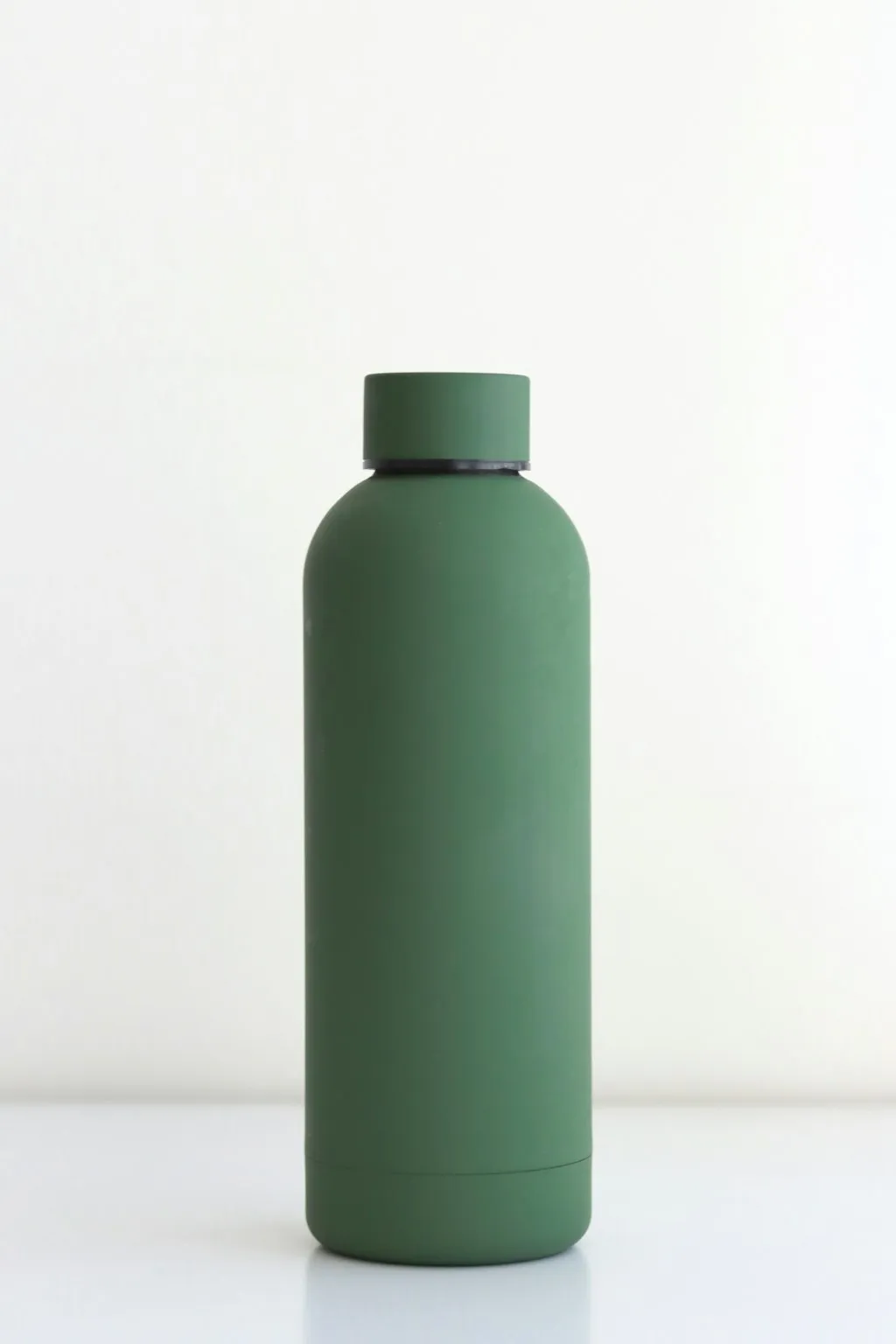
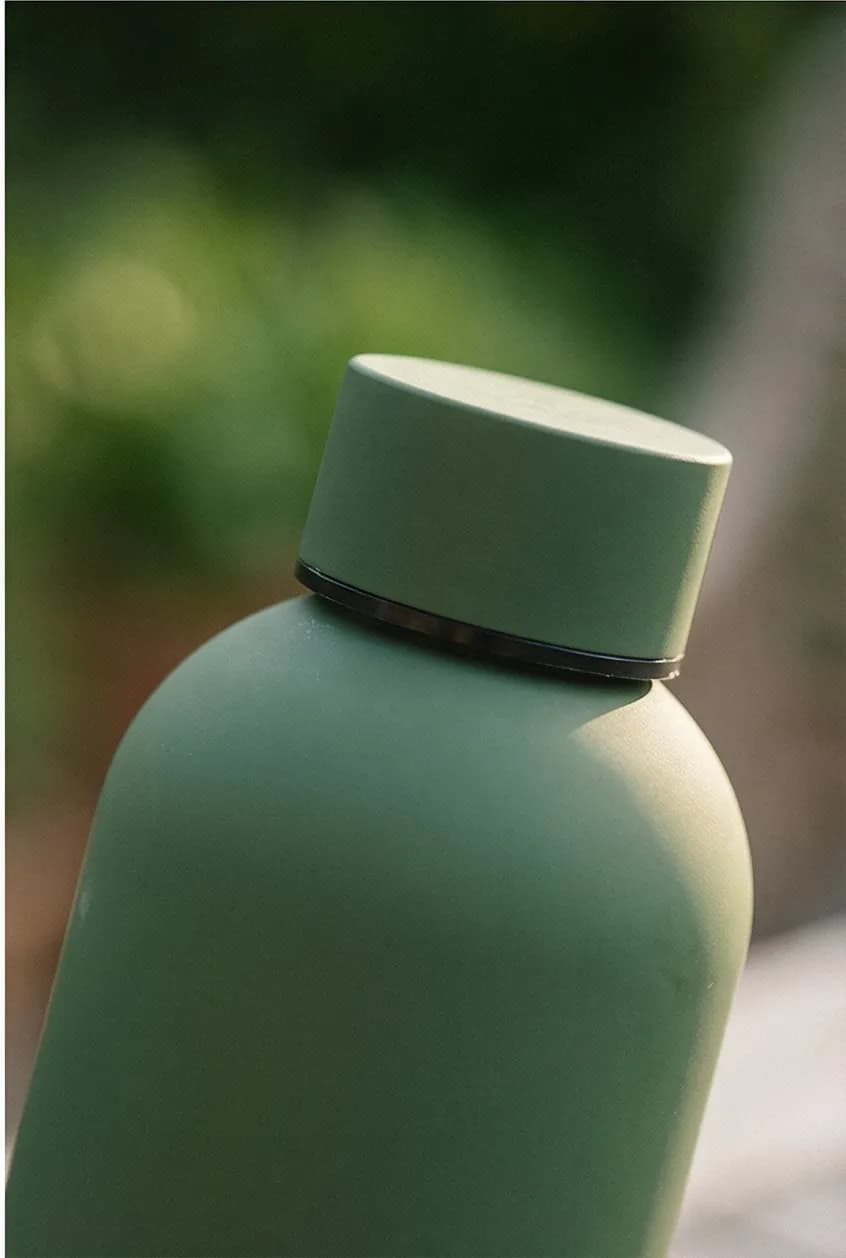
Kitchenware has one of the clearest before/after gaps in ecommerce. A plain white-background shot of an insulated water bottle tells you the product exists. The same bottle photographed on a sunlit desk beside a notebook and a sprig of eucalyptus tells you it belongs in a specific lifestyle. That gap is where the sale happens.
The water bottle below went from a clinical white-background shot to a full lifestyle context in one generation. Same product. The image on the right answers "who is this for and when do I use it?" without a word of copy.
How Cookware Brands Use Prodofoto
Prodofoto pulls your products directly from your Shopify catalog. No uploading files. No writing prompts. For a kitchenware brand with 25 SKUs, the workflow that used to require a full-day studio shoot with a food stylist now takes about 25 minutes.
Select your cookware from the Shopify catalog
Prodofoto connects to your Shopify store and shows your products. Pick the pan, bowl, knife set, or appliance you want to photograph. Your existing product images are already there — Prodofoto uses them as the starting point.
Choose Lifestyle, Product-Only, or Infographic
Lifestyle mode generates countertop kitchen scenes, styled flat lays, and in-use contexts. Product-Only generates clean catalog shots for marketplaces like Amazon. Infographic mode overlays feature callouts directly on the product image — useful for appliances where you want to highlight specific controls or materials.
Generate up to 9 photos in 60 seconds
One click generates multiple unique lifestyle variants. Each is a different angle, a different counter context, a different prop arrangement. You get a full portfolio, not a single shot — giving you options for the main gallery, secondary images, and seasonal refreshes.
Edit until the scale and material detail is right
If a generation misses the correct pan size or renders a surface texture inaccurately, use Prodofoto's natural-language editing to adjust. 'Show the handle closer and the burner visible below the pan' updates the scene without starting over.
Publish directly to your Shopify product listing
One click publishes the image directly back to the Shopify product page. No downloading, no re-uploading, no manual file management. The image goes live where shoppers see it.
A cookware brand with 25 SKUs would traditionally need a full-day studio shoot with a food stylist at $2,000–$4,000, plus $300–$600 in perishable food props. With Prodofoto: 25 products × 9 photos each = 225 lifestyle images, at under $1 per generation. No food stylist. No studio booking. No wasted produce. See the full cost breakdown.
Turn One Cookware Photo Into a Full Lifestyle Gallery
Prodofoto generates up to 9 lifestyle images per product in 60 seconds. Countertop scenes, stovetop setups, styled flat lays — all from your existing Shopify catalog. Under $1 per product. No photographer. No food props. No studio.
Frequently Asked Questions
Can AI product photography handle reflective surfaces on stainless steel pans and cookware?
Yes. AI product photography renders reflective metals, matte ceramic coatings, and cast iron textures with studio-quality accuracy. The key is starting with a clean product shot on a white or neutral background. AI handles the lighting, reflections, and material rendering in the generated lifestyle scene — the same results a controlled studio achieves with expensive lighting rigs.
What types of kitchenware photos convert best on Shopify?
The highest-converting kitchenware images combine three types: a clean white-background hero (for Google Shopping and trust), a counter-top lifestyle scene showing the cookware in active use or styled with ingredients, and a detail close-up showing texture, finish quality, or a specific feature like a pour spout or lid seal. Listings with all three consistently outperform white-background-only listings by 30–50% on conversion rate.
How much does traditional cookware photography cost?
A professional cookware photoshoot costs $500–$3,000 per day, plus $150–$500 in props (food, ingredients, kitchen tools, linens). Post-processing adds $25–$75 per final image. A catalog of 20 SKUs — each needing 6 images — runs $15,000–$45,000 in traditional photography. AI generates the same 120 images for under $1 per product.
How many product photos does a kitchenware listing on Shopify need?
Plan for 5–7 images per SKU: a white-background hero, a countertop lifestyle scene, a detail close-up (finish, handle, pour spout), a scale reference shot, a multi-product grouping if you sell sets, and a packaging/unboxing shot for gift-season traffic. High-ticket cookware ($80+) benefits from a seventh image showing the product in use — food being plated or poured.
Can I use AI product photos for my kitchenware on Amazon as well as Shopify?
Yes. Amazon requires a clean white-background image as the primary listing image, which AI generates alongside lifestyle shots. Lifestyle images can be used in the secondary image gallery. One important note: AI images must accurately represent the actual product. Don't use AI to show a non-stick coating that isn't there or a size that doesn't match the real item.
Do I need actual food, ingredients, or props to photograph kitchenware?
Not with AI. Traditional cookware photography requires physical food props — fresh vegetables, plated food, herbs — which wilt under studio lights, cost money to source, and create food-safety logistics. AI generates photorealistic food and prop scenes around your product image without any physical setup. A cast iron pan surrounded by fresh rosemary and roasted vegetables takes 60 seconds to generate.
Can Prodofoto generate kitchenware photos for my entire Shopify catalog at once?
Yes. Prodofoto pulls products directly from your Shopify catalog — no manual uploading. Select any product, choose a shoot mode (Lifestyle, Product-Only, On-Model, Infographic, or Copycat), and generate up to 9 photos per product. For a kitchenware brand with 30 SKUs, generating a full lifestyle set takes about 30 minutes at under $1 per product. One click publishes each image directly back to the Shopify product listing.
References
- Shopify: How to Take Great Product Photos (Step-by-Step Guide)
- Baymard Institute: Product Image Quality and Zoom Research
- EasyApps: Shopify Conversion Rate by Industry 2026
- Google Merchant Center: Product Image Requirements
- BigCommerce: The Complete Guide to Product Photography
- Grand View Research: Global Cookware Market Size & Forecast
- GrabOn: Ecommerce Product Photography Statistics 2026
Keep reading