Prodofoto vs Midjourney: Which Is Better for Shopify Product Photography?

Quick Answer
Midjourney generates creative AI images but invents the product rather than using yours, and has no Shopify App Store listing. Prodofoto is a native Shopify app that generates photos from your actual product image and publishes directly to your store with one click. For catalog-scale Shopify photography, Prodofoto is the purpose-built choice.
Midjourney is one of the most widely used AI image generators in the world, with over 20 million users and a reputation for producing stunning, artistic visuals. It's the tool creative directors and designers reach for when they want something visually striking. But when Shopify merchants ask "can I use Midjourney for my product catalog?" the answer gets complicated fast.
The core problem: Midjourney generates a product like yours, not your actual product. Feed it a reference photo of your leather bag and it produces a leather bag that looks similar. The proportions shift, the stitching changes, the logo becomes unreadable text-soup. That's fine for a mood board. It's not fine for a Shopify product listing where shoppers need to see exactly what they're buying.
Prodofoto starts from your existing product image and generates lifestyle scenes, on-model shots, and infographics around it. The product in the output is the product from your catalog. No drift. And since it's a native Shopify app, every generated photo publishes directly to your product listing in one click. This comparison covers both tools honestly so you can pick the right one for your store.
Tool Overview
Midjourney
Prodofoto
Feature Comparison
| Feature | Midjourney | Prodofoto |
|---|---|---|
| Shopify App Store listing | No | Yes — native app |
| 1-click publish to Shopify | No — manual download/upload | Yes |
| Uses your actual product image | No — generates a similar product | Yes — preserves your product |
| Logo and label text fidelity | Often distorted or unreadable | Preserved from source image |
| Product-only white background | Manual prompt (results vary) | Dedicated mode |
| On-model product photos | Manual prompt (accuracy unreliable) | Dedicated On-Model mode |
| Lifestyle scene generation | Manual prompt | Dedicated Lifestyle mode |
| Infographic overlays | Not available | Dedicated Infographic mode |
| Competitor photo matching | Not available | Copycat mode (Pro/Business) |
| Batch catalog processing | Manual per image | Up to 9 photos per shoot |
| AI prompting required | Yes — skill-dependent results | No — structured modes |
| Product video | No | 5s/10s video on all plans |
| AI image editing | Inpainting/vary (prompting) | Natural language AI editing |
| Free tier | No — subscription-only since March 2023 | Yes (10 one-time credits) |
| Shopify billing | Separate subscription | Through Shopify admin |
What Prodofoto Does With a Plain Product Photo
Prodofoto starts from your actual product image and generates lifestyle scenes around it. The sneaker in the output is the same sneaker you uploaded. No prompting, no guessing, one click.
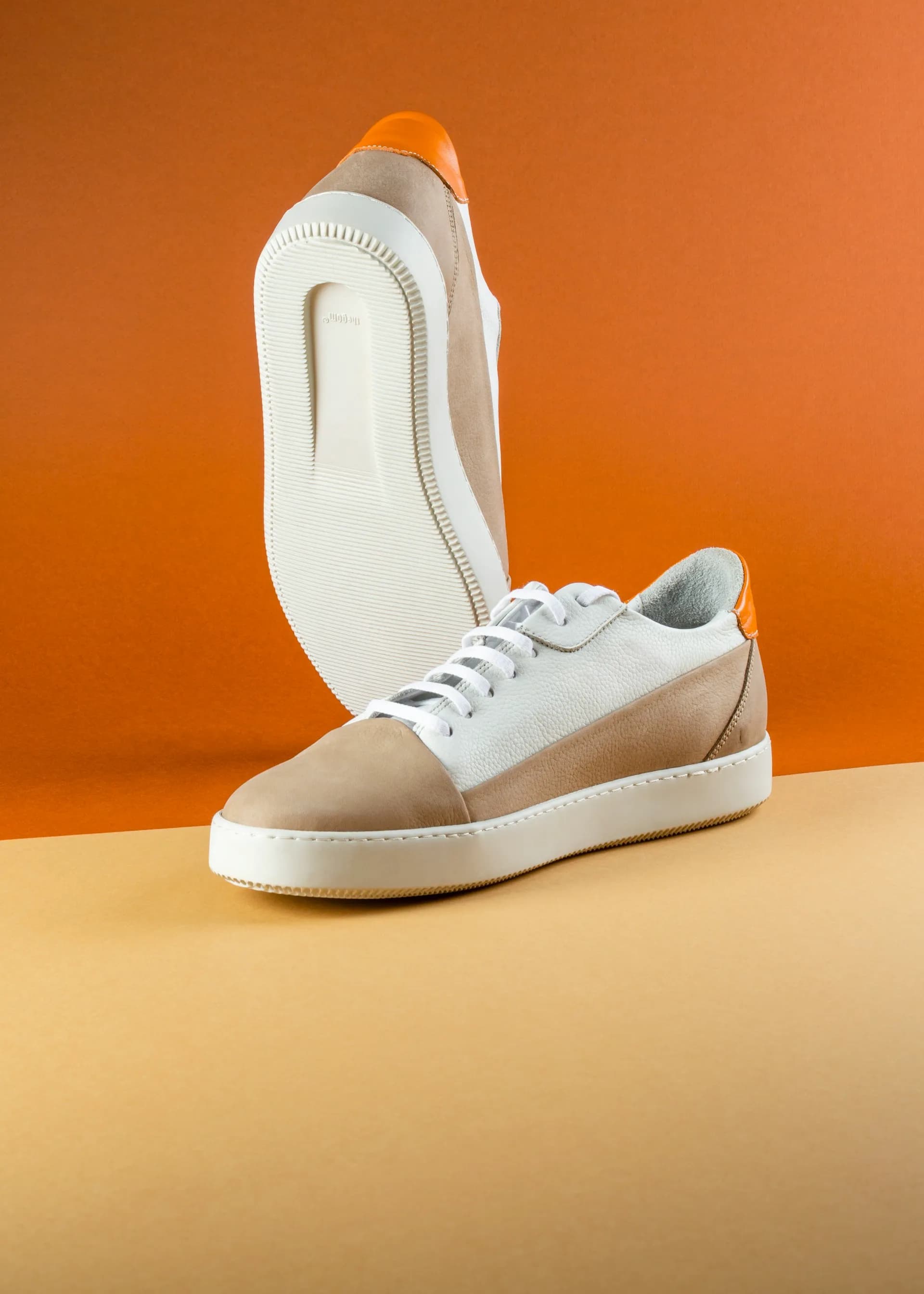
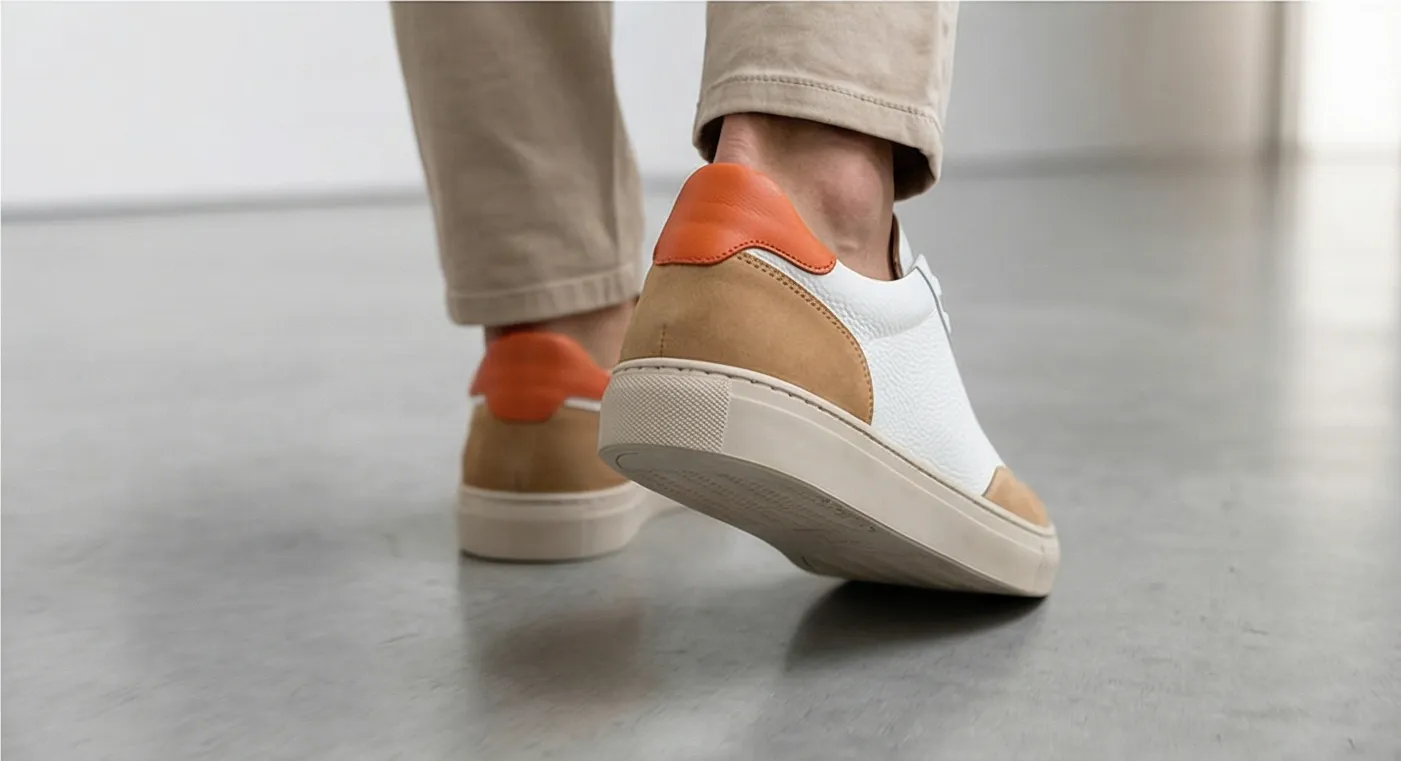
Left: original product photo. Right: Prodofoto Lifestyle mode — no prompting required, your actual product preserved.
What Midjourney Does Well
Midjourney's image quality at the V6/V7 level is genuinely impressive. The lighting, composition, and artistic coherence of its outputs are among the best available from any AI image generator. For merchants in print-on-demand who are generating the product itself (not photographing a physical item), it can produce compelling results.
Creative directors use it for campaign concepting, mood boards, and editorial-style hero shots where artistic interpretation matters more than product accuracy. If you need a sweeping coastal scene with a silhouetted figure holding something that resembles your bag, Midjourney can do that in minutes.
The Standard plan ($30/month) includes unlimited Relax mode generations, so volume is rarely a constraint once you have a subscription. The Pro plan adds stealth mode (private generations) and faster GPU allocation for high-volume work.
Why Midjourney Struggles for Shopify Catalog Photography
The fundamental issue is product fidelity. Midjourney generates from text prompts or loose reference images. When you feed it your actual product photo, it uses that as a style reference and generates something plausible. But "plausible" means altered.
- •Logo text gets garbled or replaced with decorative patterns
- •Product proportions shift slightly with each generation
- •Label copy, ingredient lists, and brand marks become unreadable
- •Unique product details (seams, hardware, texture) are reinvented
- •Consistent style across 50+ SKUs requires intensive prompting
For marketplace compliance, this is a blocker. Amazon requires the main image to accurately represent the product. Shopify merchants who publish AI-generated images where the product looks different from what ships risk increased returns and chargebacks.
There's also the workflow cost. No Shopify integration means every image goes through a manual export-upload cycle. At 50 products with 5 images each, that's 250 manual upload operations. Add time for prompting, iterating, and selecting — and a catalog refresh takes days, not hours.
What Prodofoto Does Well
Prodofoto's five shoot modes cover the core product photography use cases for Shopify merchants, each structured so no prompting is required:
- ✓Product-Only: Clean white or neutral background, studio lighting — the standard catalog shot. Your product, exactly as it looks.
- ✓On-Model: AI-generated models wearing or holding your product. No physical photoshoot, no model booking fees.
- ✓Lifestyle: Contextual scenes that show your product in use — kitchen counter, office desk, outdoor setting. The product in the scene is your actual product.
- ✓Infographic: Annotated product shots with feature callouts. Useful for conversion on detail-heavy products.
- ✓Copycat: Match a competitor's photo style or background. Pro/Business plans only.
After generating up to 9 photos in about 60 seconds, you click Publish and they appear in your Shopify product gallery. No downloading. No switching apps. The entire workflow stays inside your Shopify admin.
Workflow Comparison
Midjourney Workflow for Shopify
- 1.Open Midjourney (Discord or web app)
- 2.Write a detailed prompt describing the product and scene
- 3.Optionally attach a reference image
- 4.Generate and review 4 variations
- 5.Upscale preferred variant(s)
- 6.Inspect for logo/label distortion — re-prompt if needed
- 7.Download image(s) locally
- 8.Open your Shopify admin
- 9.Navigate to each product and upload manually
Prodofoto Workflow
- 1.Open Prodofoto inside Shopify admin
- 2.Select a product from your catalog
- 3.Choose a shoot mode
- 4.Generate up to 9 photos (~60 seconds)
- 5.1-click publish to your product listing
Pricing
| Plan | Midjourney | Prodofoto |
|---|---|---|
| Free | None — subscription required | $0 (10 one-time credits) |
| Entry | $10/mo (Basic, 3.3 GPU hrs/mo) | $9.99/mo (Starter, 50 credits) |
| Mid | $30/mo (Standard, 15 GPU hrs + unlimited Relax) | $29.99/mo (Pro, 200 credits, 2048px) |
| Pro | $60/mo (Pro, 30 GPU hrs, stealth mode) | $79.99/mo (Business, 600 credits, 2048px) |
| Max | $120/mo (Mega, 60 GPU hrs, stealth mode) | Credit top-ups available |
| Shopify integration | Not included — manual workflow | Included — 1-click publish |
Which Tool Fits Your Store?
Choose Midjourney if...
- →You sell print-on-demand (the product is the generated image)
- →You need editorial or campaign imagery, not catalog shots
- →Exact product accuracy is less critical than creative quality
- →You have a designer comfortable with prompt engineering
- →You are creating mood boards or brand concepts
Choose Prodofoto if...
- →You sell physical products on Shopify with branded packaging
- →You need catalog-scale photography across 10+ SKUs
- →You want photos published directly to your product listings
- →Product accuracy (logos, labels, shape) is required
- →You want on-model or lifestyle shots without a photoshoot
Try Prodofoto Free on Shopify
Start with 10 free credits. No subscription required. Generate your first AI lifestyle photos in under 60 seconds.
Install Prodofoto on ShopifySources
- Midjourney subscription plans and pricing
- Midjourney vs dedicated AI product photography tools (Nightjar)
- Best Midjourney alternatives for ecommerce (Photoroom)
- Prodofoto on Shopify App Store
- Baymard Institute: product image quality and conversion
- Shopify: product photography best practices
- GrabOn: product photography statistics and conversion data
Frequently Asked Questions
Can Midjourney create Shopify product photos?
Midjourney can generate impressive lifestyle imagery, but it generates a product similar to yours rather than using your actual product. Logos get distorted, proportions shift, and label text breaks. There is also no Shopify App Store listing for Midjourney — every image requires manual download and upload to each product.
Does Midjourney have a Shopify app?
No. As of mid-2026, Midjourney has no dedicated Shopify App Store listing. The only Midjourney-to-Shopify workflows involve third-party automation tools like Appy Pie or Zapier, which manually pipe generated images into your store. Prodofoto is purpose-built for Shopify with native 1-click publish.
How much does Midjourney cost?
Midjourney is subscription-only — no free tier since March 2023. Plans run $10/month (Basic, 3.3 fast GPU hours), $30/month (Standard, 15 fast GPU hours, unlimited Relax mode), $60/month (Pro, 30 GPU hours, stealth mode), and $120/month (Mega, 60 GPU hours). Companies earning over $1M/year in gross revenue must be on Pro or Mega.
How much does Prodofoto cost?
Prodofoto has a Free plan (10 one-time credits), Starter at $9.99/month (50 credits), Pro at $29.99/month (200 credits), and Business at $79.99/month (600 credits). All plans include 1-click Shopify publish. Each credit covers a full multi-photo shoot of up to 9 images.
Why does Midjourney distort product labels and logos?
Midjourney is a text-to-image model trained on internet imagery. It generates plausible-looking products from text prompts, which means it invents details it cannot read from a reference image. Proprietary logos, label text, product shape, and surface patterns all get reinvented. For catalog photography where product accuracy is required for marketplace compliance, this is a fundamental limitation.
Is Midjourney better than Prodofoto for creative campaigns?
For highly artistic, editorial, or conceptual imagery where exact product accuracy is less important, Midjourney's creative quality is hard to match. For Shopify merchants who need consistent, accurate, commerce-ready product photos that publish directly to their store catalog, Prodofoto's structured modes are a better fit.
Can I use Midjourney and Prodofoto together?
Yes. Some merchants use Midjourney for campaign concepting, mood boards, and editorial hero shots where creative flair matters more than exact product fidelity. Prodofoto handles the catalog photography that needs to be accurate and scalable. The two tools target different use cases and there is no conflict using both.