Prodofoto vs Stable Diffusion: Which Is Better for Shopify Product Photography?

Quick Answer
Stable Diffusion is a powerful open-source AI image model but requires a GPU, Python setup, and technical expertise, and has no Shopify App Store listing. Prodofoto is a native Shopify app that generates catalog-ready photos from your actual product image and publishes them to your store in one click. For Shopify merchants who need accurate, scalable product photography without the technical overhead, Prodofoto is the purpose-built choice.
Stable Diffusion is the backbone of the open-source AI image generation world. Since Stability AI released the original model weights in 2022, millions of developers and creators have built on top of it — custom checkpoints, fine-tunes, LoRAs, ControlNet extensions, and interfaces like AUTOMATIC1111 and ComfyUI. The quality ceiling, especially with newer models like SDXL and FLUX.1, is genuinely high.
But when Shopify merchants ask "can I use Stable Diffusion for my product catalog?" the honest answer is: technically yes, practically no for most stores. The model produces a product inspired by yours, not a photo of your actual product. Logos blur, label text breaks, packaging details shift. And there is no native Shopify App Store listing — every image requires manual download and upload.
Prodofoto starts from your existing product image and generates lifestyle scenes, on-model shots, and infographics around it. The product in every output is your actual product, preserved from your catalog. No GPU required, no Python environment, no prompt engineering. And since it lives inside Shopify admin, every photo publishes to your product listing with one click. This comparison covers both tools honestly so you can decide what fits your store.
Tool Overview
Stable Diffusion
Prodofoto
Feature Comparison
| Feature | Stable Diffusion | Prodofoto |
|---|---|---|
| Shopify App Store listing | No | Yes — native app |
| 1-click publish to Shopify | No — manual download/upload | Yes |
| Uses your actual product image | No — generates a similar product | Yes — preserves your product |
| Logo and label text fidelity | Often distorted (ControlNet helps but imperfect) | Preserved from source image |
| Technical setup required | Yes — GPU, Python, CUDA, model downloads | None — runs in Shopify admin |
| Product-only white background | Possible with inpainting (manual) | Dedicated mode |
| On-model product photos | Possible with ControlNet (accuracy varies) | Dedicated On-Model mode |
| Lifestyle scene generation | Manual prompting + ControlNet | Dedicated Lifestyle mode |
| Infographic overlays | Not natively available | Dedicated Infographic mode |
| Competitor photo matching | Not available | Copycat mode (Pro/Business) |
| Batch catalog processing | Manual per image | Up to 9 photos per shoot |
| AI prompting required | Yes — results are skill-dependent | No — structured modes |
| Product video | Not natively available | 5s/10s video on all plans |
| AI image editing | Inpainting, img2img (manual) | Natural language AI editing |
| Free tier | Model is free; GPU or cloud compute needed | Yes (10 one-time credits) |
| Shopify billing | Separate infrastructure cost | Through Shopify admin |
What Prodofoto Does With a Plain Product Photo
Prodofoto starts from your actual product image and generates lifestyle scenes around it. The keyboard in the output is the same keyboard you uploaded. No prompting, no GPU required, one click.
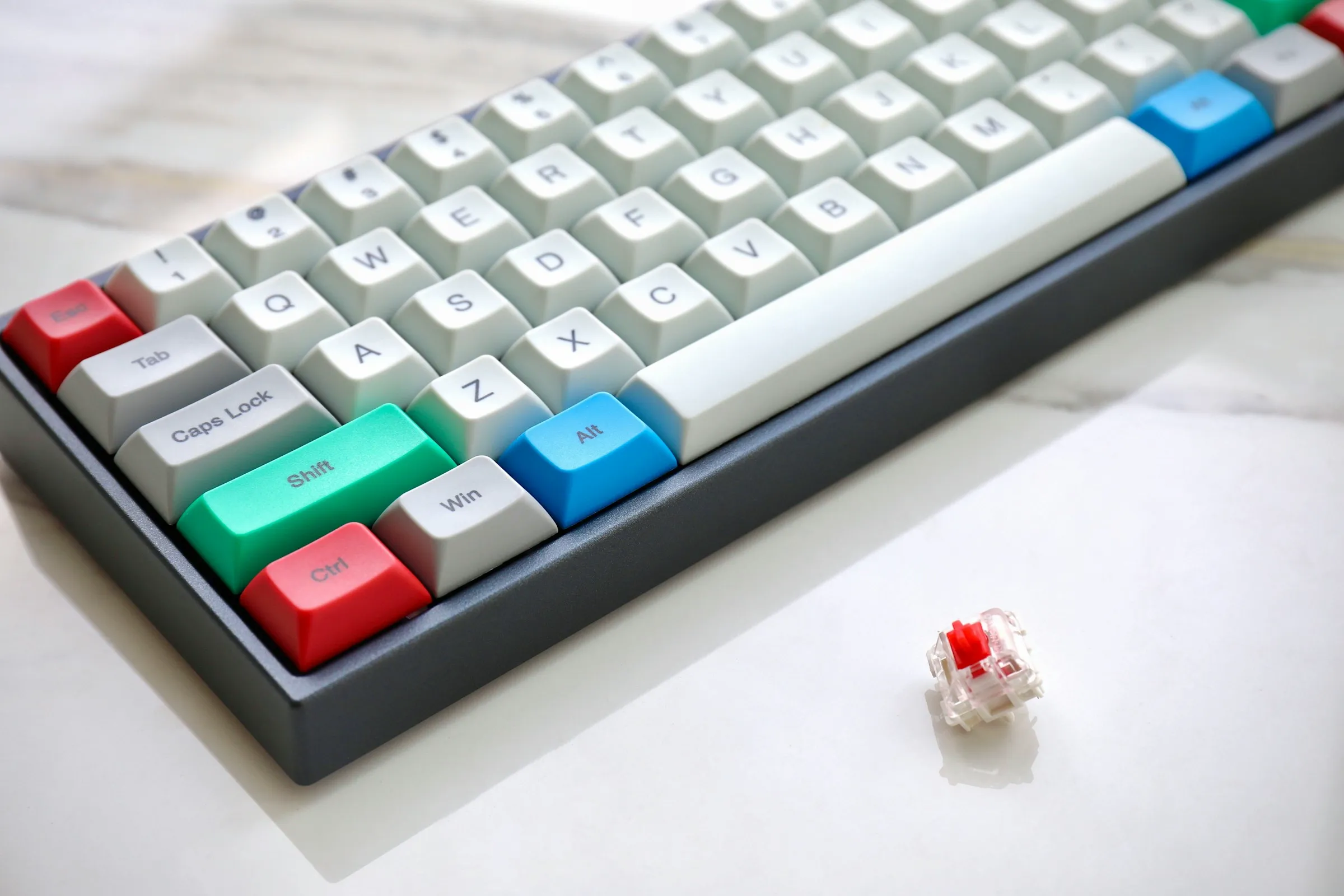
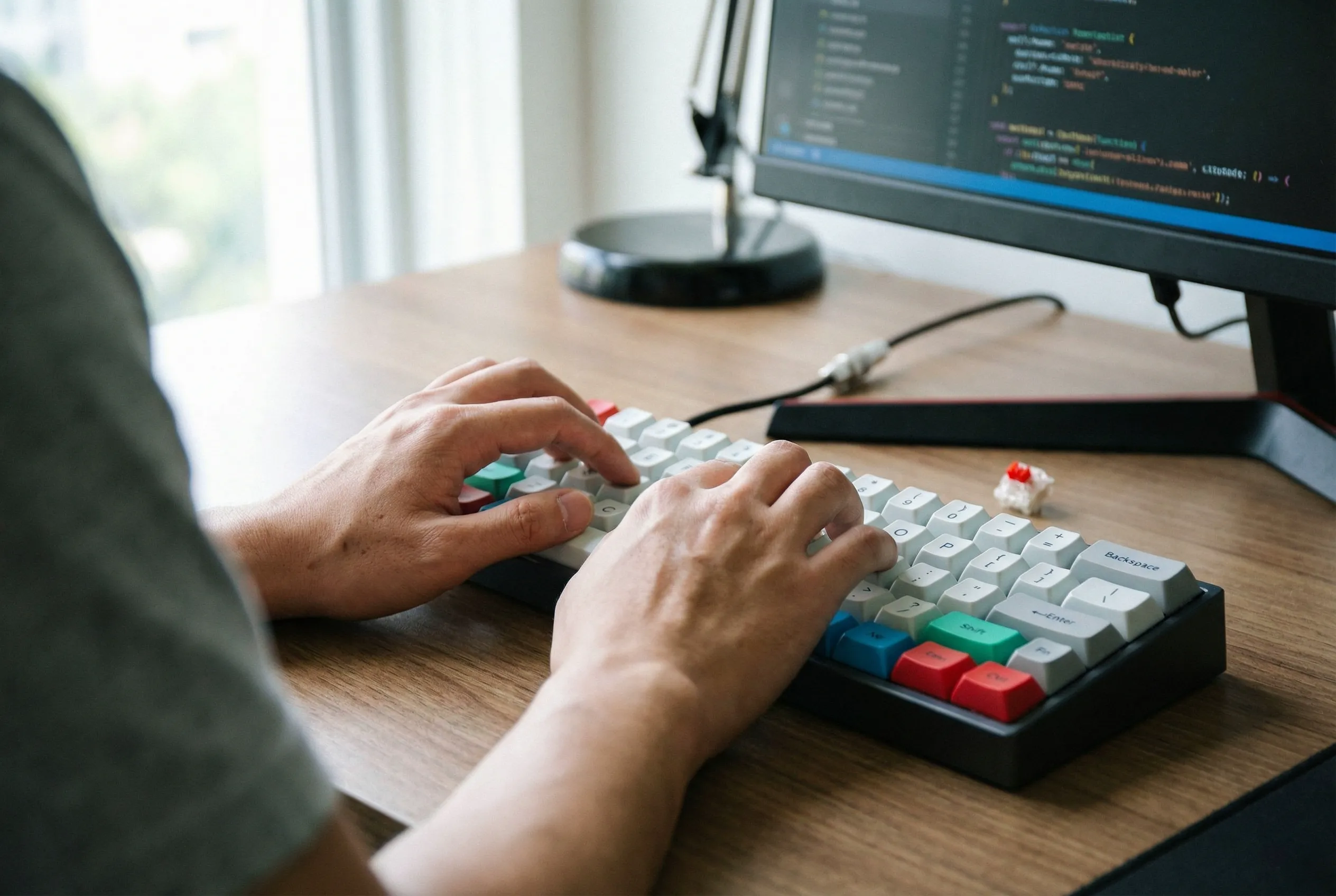
Left: original product photo. Right: Prodofoto Lifestyle mode — no prompting required, your actual product preserved.
What Stable Diffusion Does Well
Stable Diffusion's real strength is flexibility. Because the model weights are open source, the community has built an extraordinary ecosystem around it: thousands of fine-tuned checkpoints on CivitAI, ControlNet for structural guidance, LoRA training for brand style consistency, and full pipeline control in ComfyUI. For developers who want to build custom image generation pipelines, nothing offers the same depth.
For print-on-demand merchants — where the generated image itself becomes the product design — Stable Diffusion with a well-tuned art style checkpoint can produce outstanding results at essentially zero per-generation cost once the infrastructure is in place.
The newer base models (SDXL, SD3, FLUX.1) have significantly better quality than the original SD 1.5, with improved composition, lighting, and prompt adherence. For experienced users who know how to work these models, the output ceiling is high.
Why Stable Diffusion Struggles for Shopify Catalog Photography
The core problem is the same as with Midjourney: Stable Diffusion generates from text descriptions and loose reference images. It does not understand "preserve my exact product as photographed." Even with ControlNet, the model is estimating structural shape, not extracting your product.
- •Logo and label text becomes garbled or decorative pattern — even with ControlNet
- •Product proportions, colors, and surface details shift between generations
- •Branded packaging accuracy falls well below what marketplaces require
- •Achieving consistency across 50+ SKUs requires per-product prompt tuning
- •Requires 6GB+ GPU VRAM, CUDA drivers, Python, and model downloads (2–10GB per checkpoint)
- •AUTOMATIC1111 and ComfyUI have significant learning curves for non-technical users
- •No native Shopify integration — every image requires manual download and upload
Cloud inference alternatives (Stability.ai API, Replicate, RunPod) reduce the hardware barrier but add per-generation costs and still require API integration and manual Shopify upload workflows. You are building infrastructure, not running a product photography tool.
For a catalog refresh across 100 products with 5 images each, the manual download-and-upload cycle alone is 500 operations. For a Shopify merchant, this is not a photography workflow — it is a development project.
What Prodofoto Does Well
Prodofoto's five shoot modes cover the core product photography use cases for Shopify merchants, each structured so no prompting is required:
- ✓Product-Only: Clean white or neutral background, studio lighting — the standard catalog shot. Your product, exactly as it looks.
- ✓On-Model: AI-generated models wearing or holding your product. No physical photoshoot, no model booking fees.
- ✓Lifestyle: Contextual scenes that show your product in use — kitchen counter, office desk, outdoor setting. The product in the scene is your actual product.
- ✓Infographic: Annotated product shots with feature callouts. Useful for conversion on detail-heavy products.
- ✓Copycat: Match a competitor's photo style or background. Pro/Business plans only.
After generating up to 9 photos in about 60 seconds, you click Publish and they appear in your Shopify product gallery. No downloading, no switching apps, no manual uploads. The entire workflow stays inside your Shopify admin.
Workflow Comparison
Stable Diffusion Workflow for Shopify
- 1.Install Python, CUDA, and AUTOMATIC1111 or ComfyUI
- 2.Download a base model checkpoint (2–10GB)
- 3.Install ControlNet extension and download control models
- 4.Preprocess your product image for ControlNet input
- 5.Write a detailed prompt describing the desired scene
- 6.Generate and review results — iterate on prompt/settings
- 7.Check for logo distortion and product drift — re-run if needed
- 8.Upscale and post-process selected images
- 9.Download images locally
- 10.Open Shopify admin and upload each image manually
Prodofoto Workflow
- 1.Open Prodofoto inside Shopify admin
- 2.Select a product from your catalog
- 3.Choose a shoot mode
- 4.Generate up to 9 photos (~60 seconds)
- 5.1-click publish to your product listing
Pricing
| Plan | Stable Diffusion | Prodofoto |
|---|---|---|
| Entry | Free (self-hosted) + GPU hardware or RunPod ~$0.20/hr | $0 (10 one-time credits) |
| Basic | Replicate API: pay-per-generation (~$0.01–$0.05/image) | $9.99/mo (Starter, 50 credits) |
| Mid | Stability.ai API: $20/mo for 500 credits | $29.99/mo (Pro, 200 credits, 2048px) |
| Pro | Dedicated GPU instance: $50–200/mo depending on spec | $79.99/mo (Business, 600 credits, 2048px) |
| Shopify integration | Not included — build your own | Included — 1-click publish |
Which Tool Fits Your Store?
Choose Stable Diffusion if...
- →You have ML/Python experience and want full pipeline control
- →You sell print-on-demand where the generated image is the product
- →You want to train a custom LoRA on your brand aesthetic
- →You are building a custom AI photography pipeline for your team
- →You need creative or experimental imagery beyond product accuracy
Choose Prodofoto if...
- →You sell physical products on Shopify with branded packaging
- →You need catalog-scale photography across 10+ SKUs
- →You want photos published directly to your product listings
- →You have no ML background and want results in 60 seconds
- →Product accuracy (logos, labels, shape) is required for compliance
Try Prodofoto Free on Shopify
Start with 10 free credits. No subscription required. No GPU, no Python, no setup. Generate your first AI product photos in under 60 seconds.
Install Prodofoto on ShopifySources
- Stable Diffusion original paper (Rombach et al., 2022)
- AUTOMATIC1111 Stable Diffusion Web UI (GitHub)
- ComfyUI — Stable Diffusion node-based interface (GitHub)
- ControlNet: Adding Conditional Control to Text-to-Image Diffusion Models
- Stability.ai API pricing and documentation
- Prodofoto on Shopify App Store
- Baymard Institute: product image quality and conversion
Frequently Asked Questions
Can Stable Diffusion create Shopify product photos?
Stable Diffusion can generate attractive imagery, but it generates a product similar to yours rather than using your actual product. Without ControlNet tuning, logos get distorted, proportions shift, and unique product details are reinvented. There is no Shopify App Store listing for Stable Diffusion — every image requires manual setup, generation, and upload to your store.
Does Stable Diffusion have a Shopify app?
No. As of mid-2026, there is no official Stable Diffusion app on the Shopify App Store. Using Stable Diffusion for Shopify product photos requires running the model locally (AUTOMATIC1111 or ComfyUI) or via cloud APIs (Replicate, RunPod), then manually downloading and uploading each image. Prodofoto is purpose-built for Shopify with native 1-click publish built in.
Is Stable Diffusion free?
The model weights are free to download, but running Stable Diffusion requires either a GPU with at least 6GB VRAM (cost of hardware), or cloud compute (RunPod from ~$0.20/hr, Replicate pay-per-use). AUTOMATIC1111 and ComfyUI interfaces are free and open-source but require Python, CUDA, and technical setup. For most Shopify merchants with no ML background, the total cost in time and hardware is significant.
What is ControlNet and does it fix product fidelity for Stable Diffusion?
ControlNet is a neural network extension that gives Stable Diffusion structural guidance — it can help preserve the general shape and pose of a product reference image. However, ControlNet does not reliably preserve product logos, label text, color accuracy, or fine surface details. For branded products where packaging must match exactly, even ControlNet-guided generations drift from the source. You still need manual review and often manual editing.
What is the main difference between Stable Diffusion and Prodofoto for ecommerce?
Stable Diffusion is a general-purpose AI image generation framework that requires technical setup, prompting expertise, and manual Shopify integration. Prodofoto is a Shopify-native app that takes your existing product photo and generates catalog-ready photos — lifestyle shots, on-model images, infographics — in 60 seconds with no prompting required and 1-click publish to your listings.
Can I use Stable Diffusion commercially for product photos?
Most Stable Diffusion base models (SDXL, SD3, FLUX.1 dev) allow commercial use, but the specific license depends on the model checkpoint and any fine-tunes (LoRAs) layered on top. CivitAI community models often carry their own licenses. Always verify the license of any checkpoint before commercial use. Prodofoto has no such licensing ambiguity — output images are yours to use commercially.
Is Stable Diffusion better than Prodofoto for creative campaigns?
For highly experimental, editorial, or artistic imagery where the product does not need to be photographically accurate, Stable Diffusion (especially with fine-tuned checkpoints and ControlNet) can produce compelling creative results. For Shopify merchants who need consistent, accurate, catalog-scale product photos published directly to their store, Prodofoto's structured modes are the more practical choice.